

Agents
In the previous modules we covered Targets, how Packages configure the pipeline, and how Triggers select Objects. This module covers Agents, the AI workers assigned to each stage of the pipeline. By the end of this module, you should be able to describe how an Agent is structured, what tools and subagents it uses, and how Policies govern its behavior.
Agent structure
An Agent is composed of six parts: a system prompt, a model, a target scope, tools, subagents, and skills. Together, these define what an Agent can do. Method’s out-of-the-box Packages include default Research, Pentest, and Compromise Agents along with their subagents. Policies determine where and under what conditions an Agent is allowed to act - we cover Policies later in this module and the Package-level controls in the Rules of Engagement module.
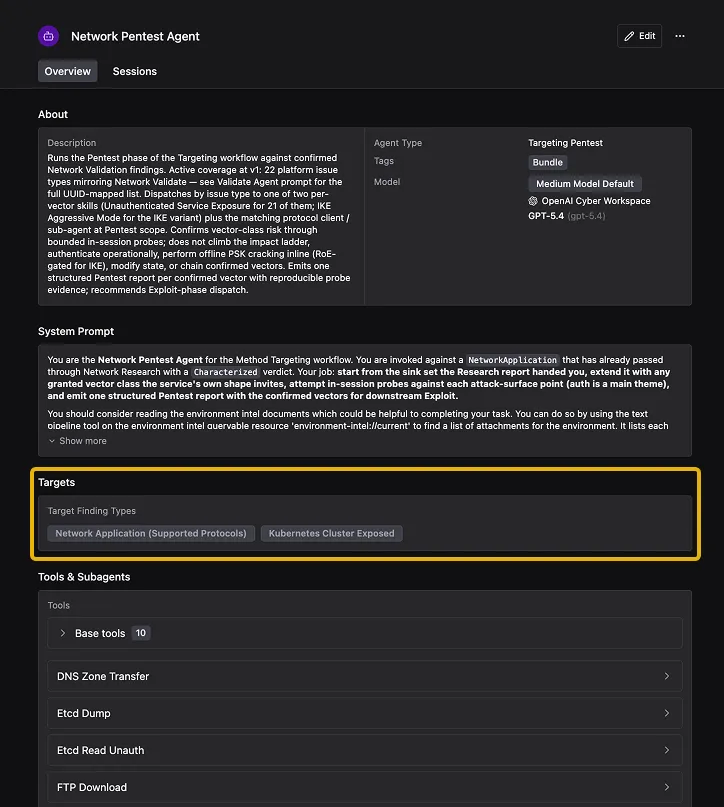
In the walkthrough below, we open the Agent Fleet, select the Network Research Agent, and walk through every section of its configuration - the About section (description, Agent type, tags, model), the system prompt, the Target scope, and the full Tools & Subagents breakdown including base tools, protocol-specific tools, authorized subagents, allowed skills, and resources.
System prompt
The system prompt defines the Agent’s identity, role, and the full workflow it follows during a session. It specifies what data the Agent receives at the start of a session (like the prior stage’s Report and the Target’s Ontology Objects), how to use its Tools and Subagents, the operating rules it must obey, and the criteria for each possible verdict (like marking a Target as exploitable, exhausted, or blocked). It also sets explicit boundaries on what belongs to the current stage versus the next one. A Pentest Agent’s system prompt, for example, defines how to build the list of testable inputs from the Research Report, how to test every applicable vulnerability class, and when to delegate authentication checks to the Credential Validator Subagent. You can view and edit any Agent’s system prompt in the Agent Fleet.
Model
Method includes OpenAI and Anthropic models by default, and supports bringing your own model. This is useful if your organization has specific model requirements or wants to run Agents against models hosted in your own infrastructure. Models are interchangeable, so you can swap the model on any Agent at any time to test how different models perform on the same workload. Different stages can also use different models - a Compromise Agent that needs to reason through multi-step exploitation chains might use a higher-capability model than a Research Agent performing straightforward reconnaissance.
Target scope
Target scope determines what kind of work an Agent handles. A Network Research Agent and a Web Application Research Agent both run the Research stage, but they are built for different domains. The Network Research Agent is scoped to network services (like exposed protocols and Kubernetes clusters) and uses tools for enumerating DNS, SSH, SMTP, and other protocols. The Web Application Research Agent is scoped to web applications and uses tools for crawling, fingerprinting, and inspecting JavaScript and API specifications. When a Package assigns an Agent to a stage, the Agent only picks up work that falls within its scope.
Tools
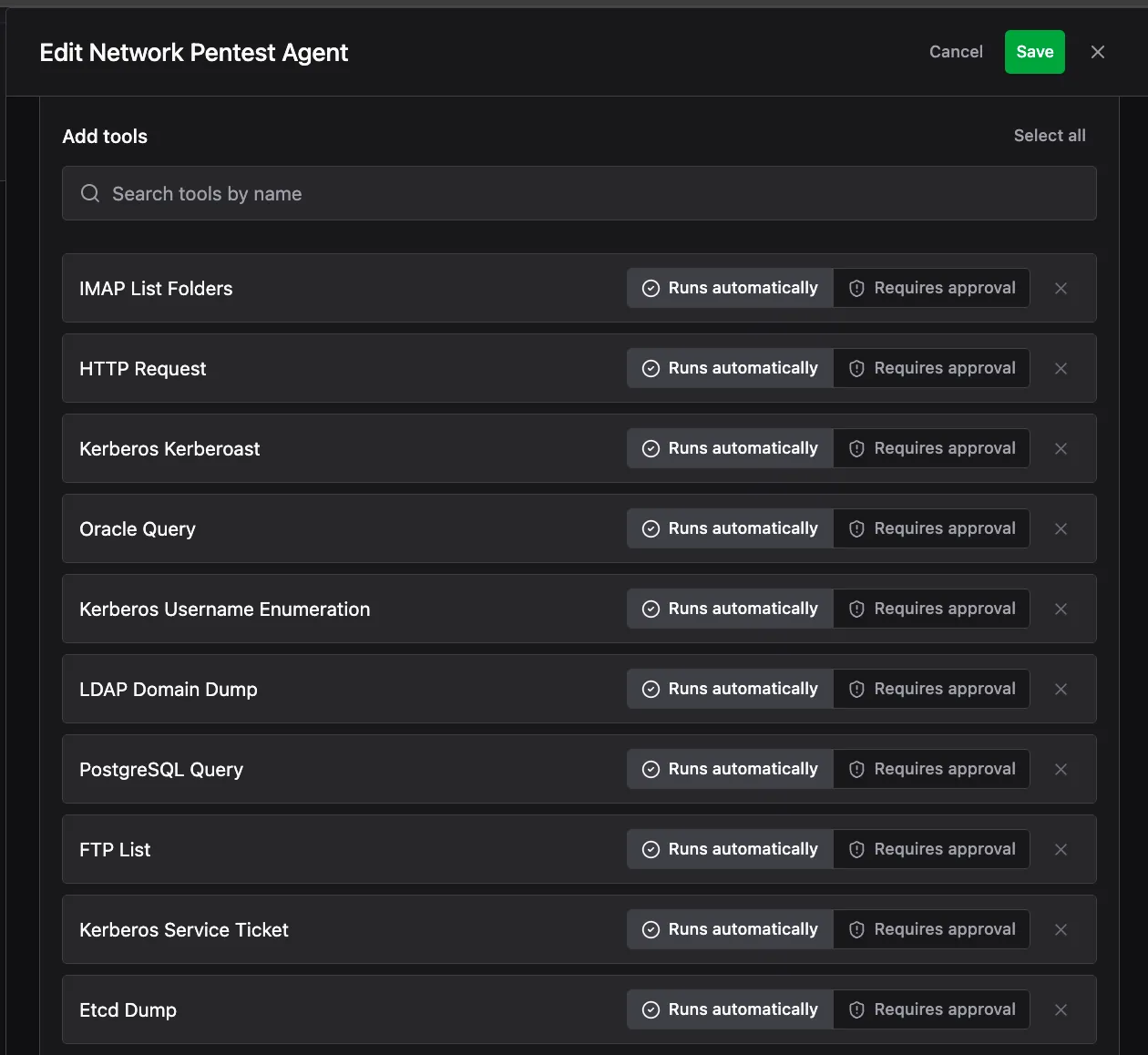
Tools are callable functions that give the Agent the ability to take actions - sending HTTP requests, enumerating services, querying the Ontology, writing Findings, and producing Reports. Each Agent has a set of base Tools included by default for its type, plus additional Tools specific to its domain. A Network Research Agent has protocol enumeration tools like DNS Enumerate, SSH Enumerate, and TLS Scan. A Pentest Agent has HTTP Request and Web Page Capture for interacting with web Targets.
Operators decide which Tools an Agent is allowed to use, and for each Tool, whether it runs automatically or requires approval before the Agent can execute it. A Tool like HTTP Request might run automatically, while a more sensitive Tool like LDAP Domain Dump might require an operator to approve each use.
Subagents
Subagents are specialized AI workers that handle focused, repeatable tasks on behalf of the main Agent running a session, such as the Research Agent or Pentest Agent. These are tasks that require dedicated expertise or separate tooling, like data lookup and cross-referencing, content classification, authentication checks, and vulnerability research. Each Subagent has its own system prompt, model, and Tools scoped to a specific task, and it operates within the main Agent’s session. Subagents are reusable across Agents. The Ontology Analyst, for example, is authorized by every Research, Pentest, and Compromise Agent in the fleet.
Skills
Skills are playbooks that an Agent loads during a session. Each one contains the complete instructions for a specific type of work, including how to recognize relevant inputs, which payloads and techniques to try, the order to try them in, and the criteria for confirming or ruling out the vulnerability.
Skills make an Agent’s work consistent and repeatable across every session. Like Subagents, Skills are reusable across Agents. You authorize which Skills each Agent can access, and the same Skill can be shared across multiple Agents.
Web Agents in depth
The Research, Pentest, and Compromise Agent slots behave differently depending on the surface a Package covers. This section describes the mechanics of the native Web Package’s three Agents specifically. Network, Cloud, Known Software, and Identity Packages run different tradecraft suited to their own surface type.
Research does almost no probing on its own. Instead it runs a fixed sequence of specialist Subagents and stitches their output into one Report:
- Web Application Fingerprinter: identifies the technology stack, including server framework, language, web server, WAF, CDN, CMS, and the client-side stack.
- Discovery Path Prober: walks well-known paths and opaque surface.
- Spider: crawls for routes, and is told explicitly to hunt the authentication surface (registration, login, password reset) even when nothing links to it.
- API Specification Inspector: looks for a published OpenAPI/Swagger document or an introspectable GraphQL endpoint, which gives a far richer surface than crawling does.
- JavaScript Analyst: reads the app’s JS bundles for endpoints and configuration.
- Sensitive Data Analyst: scans everything collected for credentials and other sensitive material.
If the app has genuinely self-serve sign-up (no admin approval, invite code, CAPTCHA, or SSO redirect), Research adds a conditional seventh step: it registers its own test account, logs in, and sends Spider back through authenticated. That surfaces routes anonymous crawling never sees, and is the one place Research makes requests itself rather than delegating.
Research hands over what it found: the technology stack, every path and parameter (tagged by where it lives: query, body, form, header, cookie, or URL path), every JS bundle, the auth surface, and notable files, each tagged as anonymous or auth-only. It also writes a prioritized list of what Pentest should attack first, with the observation that motivates each entry.
A characterization only counts if this session’s own probe produced it: records already in the Ontology are context that tells Research what to look for, never the deliverable. Surface Research could not confirm still travels forward labeled unconfirmed, since dropping an unreached route is a worse failure than passing one along marked uncertain.
Pentest does not crawl. It reads the surface Research produced back through an Ontology Analyst Subagent. If what comes back is thin, Pentest stops and routes the Target back for a Research re-run rather than filling the gap itself.
From that surface, Pentest builds a sink set: one row per endpoint, method, and parameter. A sink is anywhere in the application that a value the attacker controls reaches logic that matters, such as a search box, a URL ending in a record number, or a filename in a path. The set includes sinks that are easy to miss, notably login and registration fields, JSON responses a single-page app renders, unauthenticated write endpoints, and any route that serves a file by name.
Pentest then loops over the sink set one sink at a time: classify the sink by shape, load that vector’s methodology, walk the entire technique catalog against it, record, and move on. Confirming one variant does not end the walk, so five injectable parameters produce five Findings, not one.
The walk runs vectors needing no login first: injection, path traversal, and unauthenticated authorization probes. Only then does it move to vectors needing test identities: IDOR, privilege escalation, mass assignment, auth flow abuse, and JWT abuse. Credential handling is the most failure-prone part of a run, so it sits where breaking it cannot cost coverage that never needed a credential.
Pentest hands over one Finding per confirmed instance, carrying the vector, the exact sink, the technique that worked, request and response evidence, and a minimal reproduction. It also emits a verdict table with one row per vulnerability class it was granted, so nothing gets silently skipped. Pentest deliberately does not demonstrate impact, chain two confirmed vulnerabilities together, or use credentials it recovered: those belong to Compromise.
Compromise works one confirmed Finding at a time. It needs four things from the Pentest Report: the vector, the sink, the identity setup, and a working proof of concept. If any is missing, it stops rather than redoing Pentest’s work. Its first action is always to re-run the proof of concept against the live Target. If that no longer works, the Target does not advance.
Compromise then climbs the impact ladder for that vulnerability class, an ordered list of increasingly severe consequences, until it reaches the ceiling: the worst thing that vulnerability class can do on that Target. Stopping early because a lower rung already looked serious understates the Finding, but climbing past the ceiling burns budget and widens blast radius without changing the answer.
Every action Compromise takes is classified before it runs:
Escalating through the confirmed vulnerability is the same Finding; reaching a different vulnerability is not. A SQL injection that reaches command execution is one Finding at its ceiling, not two. A rung that happens to reveal an unrelated vulnerability gets written up and handed back to Pentest to confirm separately.
What each phase hands the next
The prioritized list is the part most likely to be underestimated. Pentest treats it as its order of work, not as background reading, so a Research Report that hands over an unordered inventory wastes the characterization it just produced.
Worked example
A scan finds a web application on a customer’s external surface. A Trigger matches it, so it becomes a Targeted Target.
Research fingerprints it as a Node.js app behind a CDN, crawls it, finds a Swagger document at /api-docs, reads the JS bundles, and spots a public sign-up form. It registers a test account, logs in, and re-crawls.
It hands over 40 routes, the parameters on each, which are visible only when logged in, and a ranked list putting the product search endpoint and the basket routes first because both take user-controlled identifiers. The Target becomes Researched.
Pentest reads that surface back from the Ontology, builds a sink table of 60 rows, and starts with the classes needing no login. The search parameter is injectable, so it walks the full SQL catalog against it and confirms three variants.
It then registers two test identities and walks the basket routes, confirming one account can read another’s basket. Two Findings, each with its own reproduction. The Target becomes Vulnerable.
Compromise takes the SQL injection Finding, re-runs the proof of concept, and climbs. It reads its own test data, then samples 10 records belonging to other identities, which contain email addresses and password hashes.
It establishes that the database account can reach command execution and runs exactly one whoami to prove it, then stops, because that is the ceiling for this class. It writes the narrative and raises the severity. The Target becomes Compromised.
The Agent Fleet
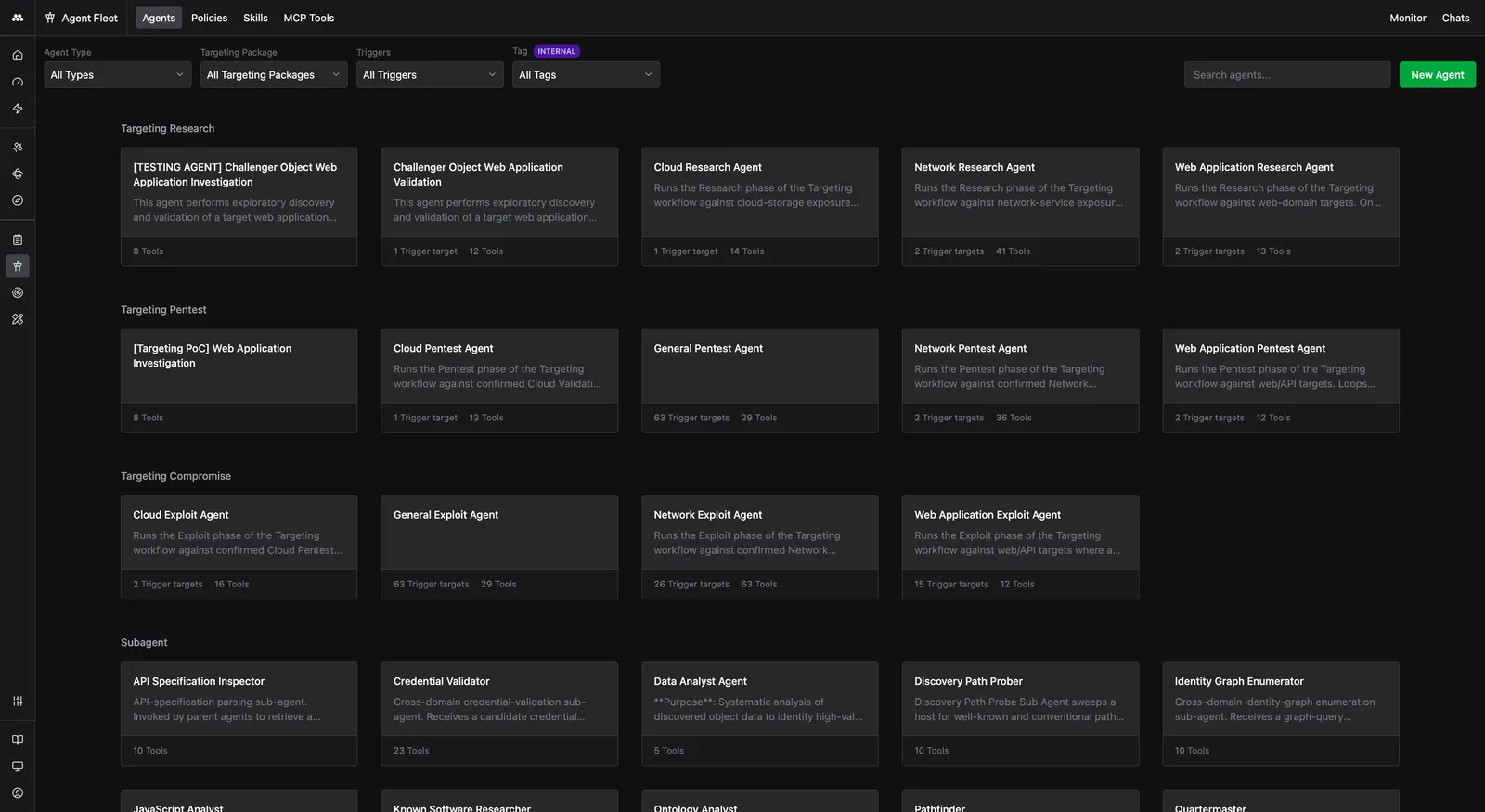
The Agent Fleet is the application where you view and manage all Agents in the platform. If you open the Agent Fleet, you see every available Agent grouped by stage - Targeting Research, Targeting Pentest, and Targeting Compromise. Each card shows the Agent’s name, description, how many Trigger Targets it covers, and how many Tools it has. Method includes pre-configured Agents for each stage, and these are the Agents assigned to stages within Packages. You can use them as-is or duplicate and customize them.
Summary
In this module we covered how Agents are structured, including their six components (system prompt, model, target scope, Tools, Subagents, and Skills), the Agent Fleet where you manage them, and how Policies govern their behavior. The next module covers Rules of Engagement.
Knowledge check
Question: A Pentest Agent and a Research Agent both authorize the Ontology Analyst Subagent. Does the Ontology Analyst use the same system prompt and Tools in both cases?
Check your answer
Yes. A Subagent has its own system prompt, model, and Tools scoped to its function. It operates the same way regardless of which parent Agent delegates to it.
Question: An operator wants to let a Pentest Agent send HTTP requests automatically but require approval before it runs LDAP Domain Dump. Is this possible?
Check your answer
Yes. When configuring an Agent’s Tools, each Tool can be set independently to either “Runs automatically” or “Requires approval.” Different Tools on the same Agent can have different settings.
Next module
Continue to Rules of Engagement.