

Triggers
In the previous modules we covered what Targets are and how Packages bundle the components that configure the pipeline. This module covers how Method discovers and models assets as Objects, how Triggers search over those Objects to create Targets, and the Trigger types available. By the end of this module, you should be able to describe how Objects are created and how Triggers select them.
How Method discovers and models assets
Method first discovers and models assets as Objects in the Ontology. Triggers then search over those Objects to create Targets. Method runs scans against seed data (FQDNs and CIDRs), scheduled through Automator, and stores what it discovers as Objects in the Ontology. Each Object belongs to a specific type - Web Application, IP Address, FQDN, Cloud Host, and more - and that type determines its properties and relationships. A single web application like zamunda-industries.com produces dozens of Objects: the web application itself, its endpoints, HTTP request/response pairs, web pages, files, and URLs. Each Object has properties (like a port number or hostname), links to related Objects (like the Web Application running on an IP Address), and source data for how it was discovered.
If we open Explorer - the application for browsing Objects in the Ontology - and scope to an Environment, we see every Object type Method has discovered and how many of each exist.
In the walkthrough above, we can see Object types like URLs, HTTP Request Responses, Ports, Web Pages, Web Files, IP Addresses, Web Applications, and Network Applications. Each Object type is clickable, and filtering to one shows the individual instances with their properties. This is how we understand what has been discovered in an Environment before configuring any Targeting.
We can also inspect any Object type’s definition in Explorer under Ontology Definitions to see the properties and relationships Method models for it. Each definition includes a relationship graph showing how that Object type connects to others.
How Triggers work
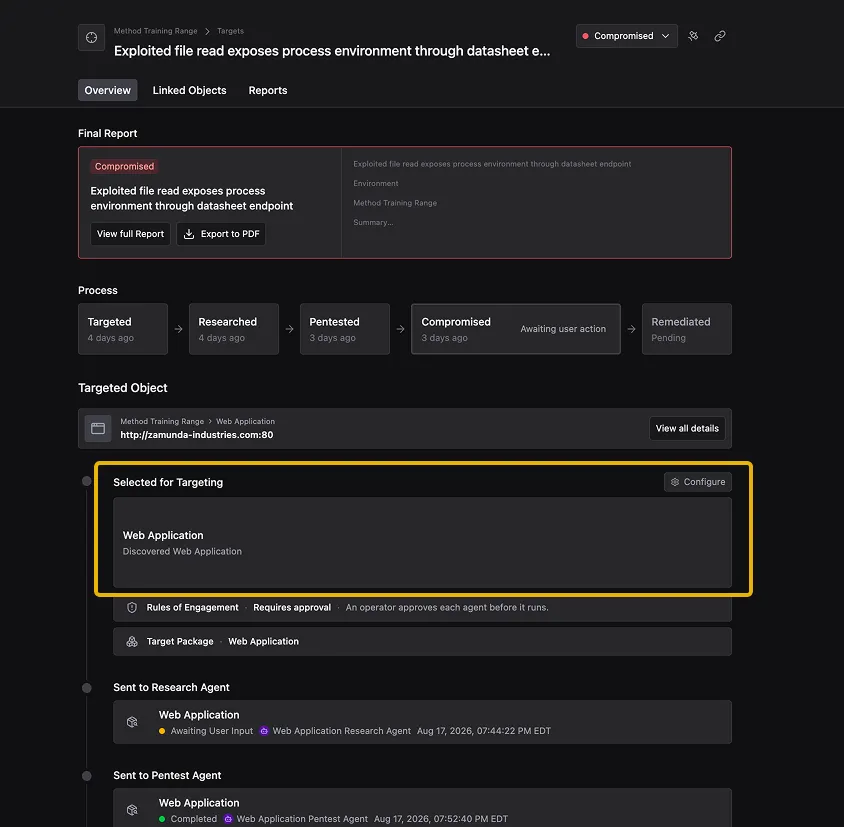
A Trigger is a deterministic filter that searches over the Objects in an Environment and selects the ones that become Targets. Method provides a set of Triggers out of the box (listed at the bottom of this module), and you choose which ones to enable in a Package. Triggers can be broad - like targeting every discovered web application - or specific to known technology in your organization, like WordPress instances or exposed GraphQL endpoints. Each Trigger matches on a specific condition: an Object’s type, its properties, or a Finding attached to it. When a Trigger matches an Object, that Object is enrolled as a Potential Target in the funnel.
In our zamunda-industries.com example, the Method Web Package includes a Discovered Web Application Trigger. Because zamunda-industries.com is a Web Application Object in the Ontology, that Trigger matched it and enrolled it as a Potential Target.
Types of Triggers
Method ships dozens of standard Triggers covering exposure and vulnerability classes. They fall into three categories:
- Object-type Triggers match when Method discovers a specific type of Object. Examples: “Discovered Web Application,” “Discovered Network Application,” “Discovered Cloud Host.” These are the broadest Triggers - any Object of that type becomes a Target.
- Finding-based Triggers match when a Finding is attached to an Object. Examples: “CVE Exposure on Network Application,” “Weak Credential Discovered,” “Web Injection Vulnerability on Web Application.” These produce Targets only where the finding engine has already identified a specific risk.
- Property-based Triggers match on specific properties of an Object. Examples: “Web Page including Stale Static Asset at URL,” “Web Resource with Interesting Path.” These look for characteristics that suggest an attack path even when no Finding exists.
The more Triggers a Package declares, the more Targets it generates, because each Trigger runs independently and compounds Target volume across every matching Environment. We can use Explorer to estimate how many Objects a new Trigger condition would match before adding it to a Package.
Summary
In this module we covered how Method scans seed data and creates Objects in the Ontology, how Triggers filter those Objects to create Targets, and the three categories of Triggers Method ships (Object-type, Finding-based, and property-based). The next module covers Agents - the AI workers that carry out the Research, Pentest, and Compromise work on each Target.
Knowledge check
Question: An Object exists in the Ontology but no Trigger has matched it. Can an Agent work on it as a Target?
Check your answer
No. An Object only becomes a Target when a Trigger selects it. Without a Trigger match, it remains part of the Environment’s data but is not enrolled in the Targeting funnel.
Question: An Environment has 500 Web Application Objects and 200 Network Application Objects. A Package declares two Triggers: “Discovered Web Application” and “Discovered Network Application.” How many Targets does the Package generate?
Check your answer
Up to 700. Each Trigger runs independently, so the Web Application Trigger selects up to 500 Targets and the Network Application Trigger selects up to 200. They compound across the same Environment.
Next module
Continue to Agents.