

Packages
In the previous module we covered what a Target is and how the Targeting funnel works. One of the components we introduced was the Package. This module covers what a Package is, what it contains, and how to browse and configure one in the platform. By the end of this module, you should be able to describe the four parts of a Package and how they work together to configure the Targeting pipeline.
Method-shipped Packages
Method ships native Packages covering common attack surface categories. Each one comes with pre-configured Triggers, Agents for each pipeline stage (Research, Pentest, and Compromise), and default Rules of Engagement:
- Web - web applications, APIs, JavaScript surfaces, and authentication flows
- Network - exposed hosts, ports, services, and protocol-level misconfigurations
- Cloud - cloud resources across AWS and Azure, including object storage and IAM
- Known Software - software with known CVEs, CMS plugins, and admin interfaces
- Identity - cloud and SaaS identity graphs, SSO, federation, and credential reuse
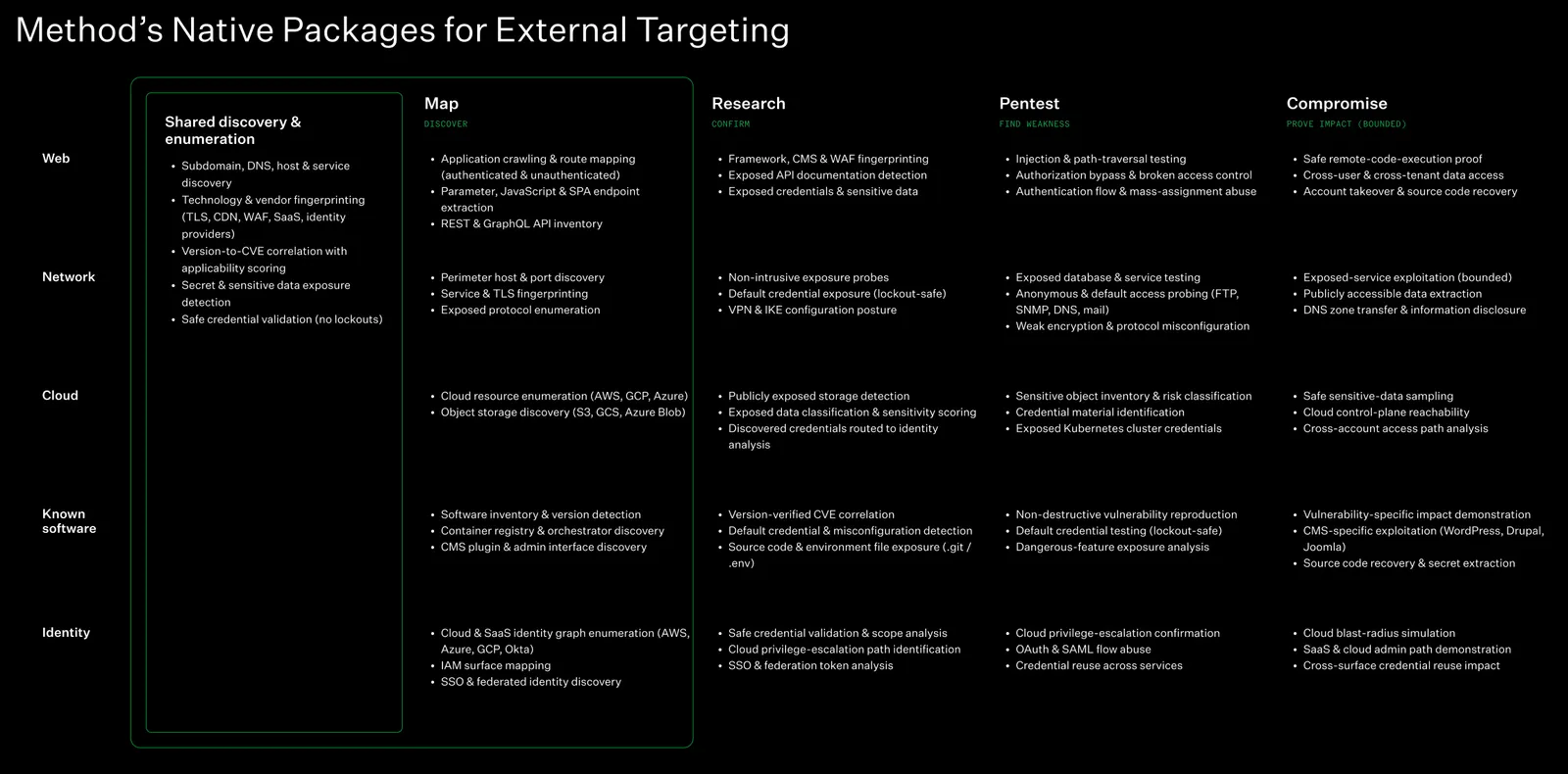
For most deployments, these cover the standard categories without any additional configuration.
To see what a Package contains and how to configure it, we open the Targeting application from the left navigation, select the Configure tab at the top, then click Packages. The left sidebar separates Method-shipped Packages from custom ones. Clicking a Package opens its detail view - Triggers, Environments, Rules of Engagement, and Agents - and clicking Edit makes everything configurable.
In the walkthrough above, we open a Web Targeting Package and click Edit to enter configuration mode. From there we walk through each section: Triggers (selecting from 60 available), Environment scope (toggling between “Every environment” and specific Environments), Rules of Engagement (Stage Policy, No-strike list), and Agents (assigned per stage).
What a Package contains
Each Package is made up of four parts. We cover the first three in dedicated modules next.
Triggers
Triggers are the deterministic filters that decide which Objects become Targets. A Package can declare multiple Triggers, and each one runs independently. The Web Package, for instance, includes Triggers for discovered web applications, web injection vulnerabilities, and stale static assets. Choosing which Triggers to enable is how we control the volume and focus of the Targeting work.
Agents
Each Package assigns one Agent per pipeline stage - Research, Pentest, and Compromise. The Agent assigned to each stage determines what tools and techniques are available for that phase of work. Different Packages use different Agents - the Web Package assigns web-specific Research and Pentest Agents, while the Network Package assigns Agents built for network services and protocols.
Rules of Engagement
Rules of Engagement control how the work is carried out. Three controls live at the Package level: Stage Policy (how far Agents proceed before a human signs off), No-strike list (which assets are off-limits), and Risk Axes (what categories of actions Agents are blocked from taking). A fourth control - Tool Policy - lives on the Agent itself. Together, these control Agent autonomy and set boundaries for Agent behavior.
Cloning Packages
When we need a Package that is close to an existing one but with different Triggers, Agents, or Rules of Engagement, we can clone an existing Package. Cloning copies the full configuration and opens it in edit mode so we can adjust what we need without starting from scratch. We can also build from scratch and configure each component individually.
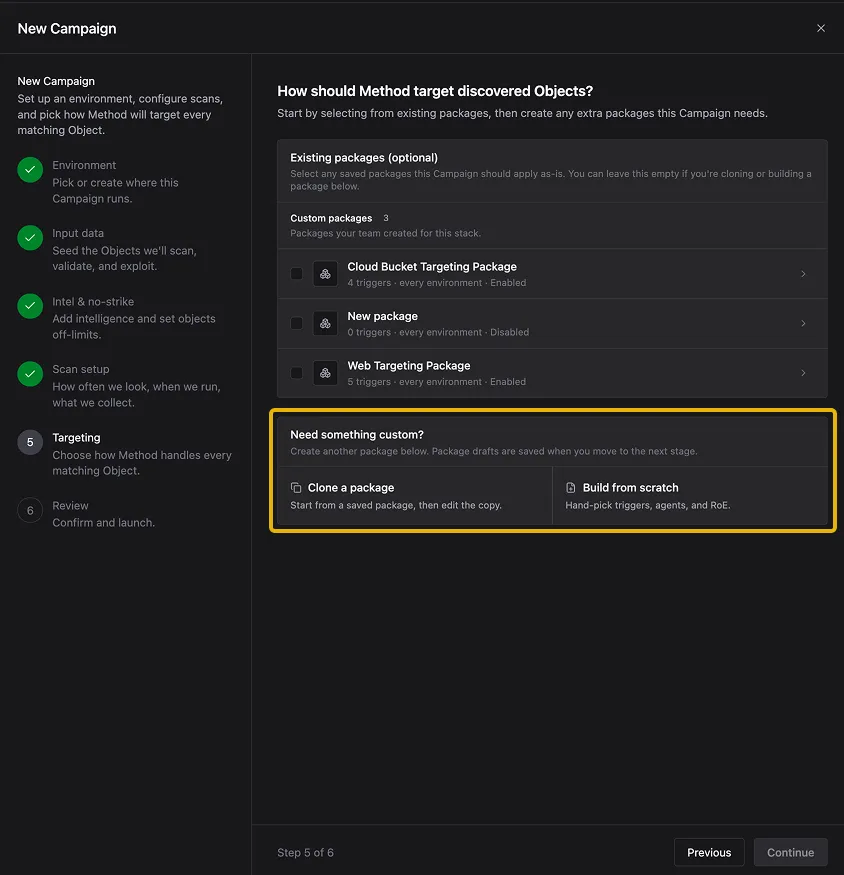
When two Packages share the same Environment and Trigger criteria, Method surfaces the overlap so you can decide how to handle it: keep both, which creates separate Targets for each Package, or consolidate to a single Package.
Building fully custom Packages with hand-picked Triggers, Agents, and Rules of Engagement is covered in a specialized training that will be available soon.
Summary
In this module we covered what a Package is, how to browse and configure one in the platform, and the four parts that make up a Package: Triggers, Agents, Rules of Engagement, and Environment scope. We also looked at Method’s native Packages and how to clone or build custom ones. The next module covers Triggers, starting with how Method discovers assets and then how Triggers search over them to create Targets.
Knowledge check
Question: A Package has five Triggers and is scoped to every Environment. What happens to Target volume if we add three more Triggers?
Check your answer
Target volume increases. Each Trigger runs independently, so adding Triggers compounds the number of Objects that get selected as Targets across every matching Environment.
Question: A Package is scoped to “All environments.” A new Environment is added to the platform next week. Do the Package’s Triggers apply to it?
Check your answer
Yes. “All environments” means the Package’s Triggers apply wherever there are matching Objects, including Environments added later. To prevent this, scope the Package down to specific Environments or filter by tag.
Next module
Continue to Triggers.