

Rules of Engagement
In the previous modules we covered what Targets are, how Packages bundle the components that configure the pipeline, how Triggers select Objects to become Targets, and how Agents are structured. This module covers Rules of Engagement (RoE), the controls that govern what Agents can and cannot do. We saw the RoE section of a Package in the Packages module. Here we break down each control. The next module covers how to launch a Campaign.
Layers of control
When configuring how Agents operate, an operator needs to answer several different questions at once: is this Environment approved for this kind of work? Should this specific domain or asset be off-limits? How far should Agents run before a human reviews the results? Should this particular tool require approval every time it executes?
An Environment can be approved for targeting, but a specific asset within it can still be blocked. A Package can allow Agents to run through Research and Pentest automatically, but still require approval before Compromise. An Agent can have access to a tool, but that tool can still require operator sign-off before every use.
RoE exist at three levels: Environment, Package, and Agent. When rules overlap across levels, the strictest rule always applies.
These controls are enforceable because Agents do not make arbitrary requests to the Environment. Every action goes through a Tool, and every Tool operates on a known Object in the Ontology. The platform knows exactly which Object each tool call touches, so it can block execution when that Object is on a No-strike list. Objects on the No-strike list are also stripped from the Agent’s context before the AI model sees them, so the Agent does not know they exist in the first place.
Environment level
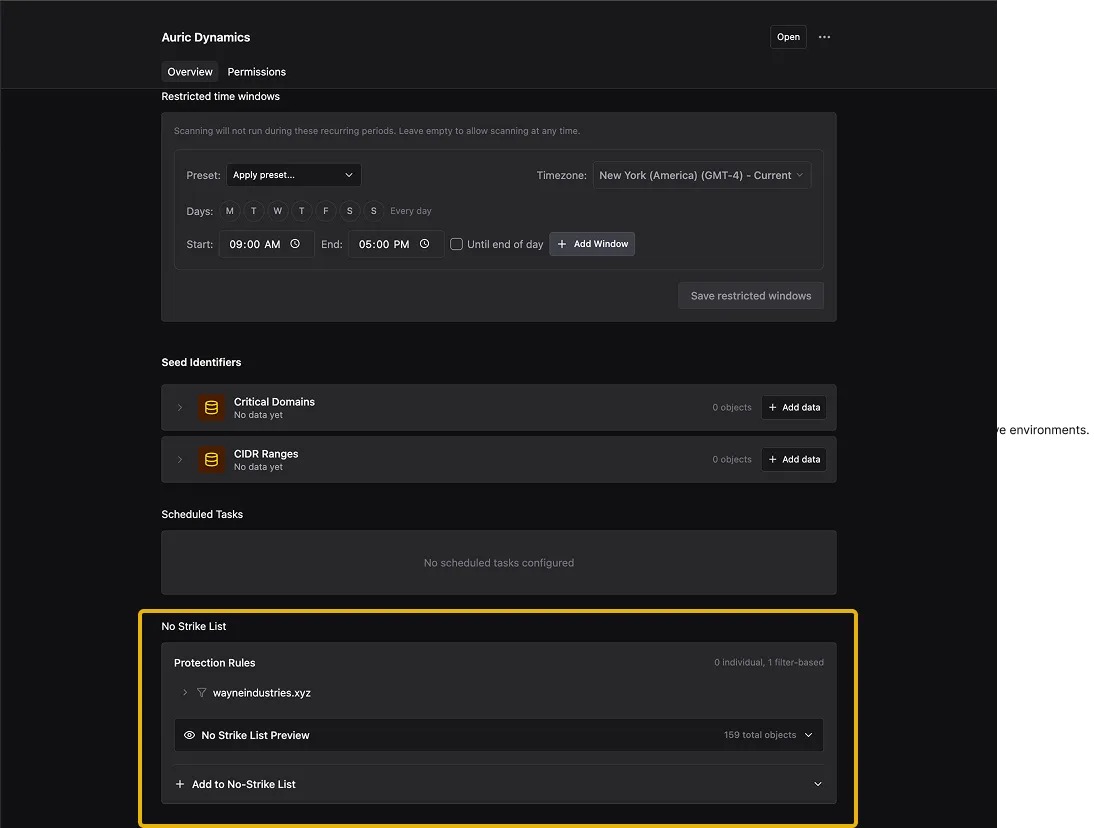
No-strike list
The Environment-level No-strike list protects assets across every Package running in that Environment. Any Object on this list is off-limits to all Agents, regardless of what a Package’s own rules allow. This is the broadest layer of protection - it applies before any Package-level or Agent-level rules are evaluated. You can configure it in the Environments section under Admin in the left navigation.
Package level
Stage Policy
Stage Policy is the Package-level control that determines how far a Target moves through the funnel automatically before it stops and waits for human approval. Each stage in the pipeline (Research, Pentest, and Compromise) has an Agent assigned to it. Stage Policy answers which of those stages Agents can run on their own and where a human takes over.
Stop after Research
The Research Agent characterizes the Target automatically (what it’s running, what’s reachable, what looks testable). Then it stops. The Target is teed up and waiting for an operator to review the Research Report and approve active testing. This is the right starting point when the team is still building trust in the platform or wants to review what the system found before anything gets tested.
Stop after Pentest
Research and Pentest both run automatically. Agents characterize the Target, then test every endpoint and parameter for vulnerabilities. When they finish, Targets with confirmed vulnerabilities are teed up and waiting for an operator to review them before the Compromise Agent proves impact. This is the recommended operating model for most deployments - it lets Agents find and validate vulnerabilities on their own, but keeps a human in the loop before proving what an attacker could actually do with them.
Full auto
The Target moves through Research, Pentest, and Compromise without stopping. The No-strike list and Risk Axes still apply, but the pipeline does not pause for human input at any stage.
Manual only
Every stage transition requires a human. Research does not start until an operator approves it. After Research, the operator approves Pentest. After Pentest, the operator approves Compromise. Use this for sensitive environments or when the team wants to observe every stage before trusting Agents to run on their own.
No-strike list
The Package-level No-strike list defines Objects that every Agent in that Package must avoid. This works on top of the Environment-level No-strike list. If an Object is blocked at either level, Agents cannot touch it. The No-strike list supports two modes:
- Individual Objects: select specific Objects by type from the Ontology - for example, a particular Active Directory Account or Web Application. Use this to exclude a small number of known assets by name.
- Filter-Based: define rules that match a class of Objects based on conditions. Use this to exclude a category of assets without listing each one individually.
Risk Axes
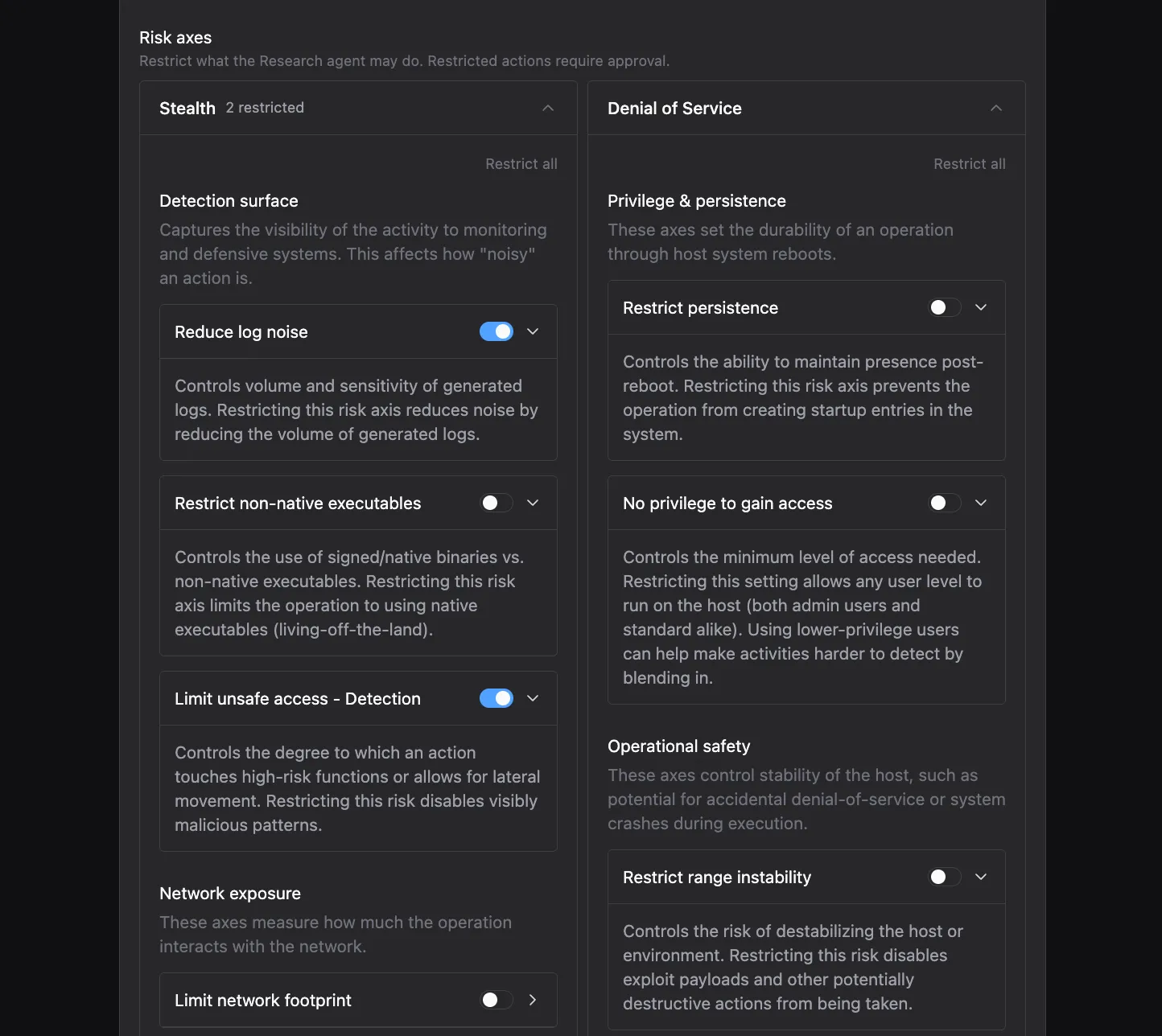
Risk Axes constrain what an Agent may do while it runs, grouped along two dimensions:
- Stealth: how visible and noisy the Agent’s activity is
- Denial of Service: how much the Agent’s actions risk host stability and availability
Each dimension has specific toggles visible in the Package editor. When a toggle is enabled, the Agent must request your approval before taking that action, so you can grant autonomy on safe behavior and gate anything riskier.
Stealth
Denial of Service
- Reduce log noise: limits actions that generate high volumes of log entries on the target, keeping the Agent’s footprint quieter in SIEM and endpoint telemetry.
- Limit network footprint: restricts actions that produce unusual network traffic patterns, such as large scans or connections to uncommon ports.
- Restrict non-native executables: prevents the Agent from dropping or running binaries that are not already present on the target, forcing it to use tools native to the environment.
- Restrict exfiltration: limits the Agent’s ability to move data off the target, controlling outbound transfers of discovered information.
- Limit unsafe access: restricts access methods that could expose credentials or session material in transit.
Risk Axes are set per Agent, per stage within a Package, so different Agents can have different constraints. The Research Agent might have all Stealth toggles enabled while the Pentest Agent has only some enabled.
Agent level
No-strike list
Agents also have their own No-strike list, visible in the Agent detail view under Rules of Engagement. This adds another layer of protection on top of the Environment and Package levels. If an Object is blocked at any level (Environment, Package, or Agent), the Agent cannot interact with it.
Tool approvals
We covered this in the Agents module. For each tool an Agent has access to, you configure whether it runs automatically or requires approval before executing.
Summary
In this module we covered how Rules of Engagement control what Agents can and cannot do across three levels: Environment, Package, and Agent. The strictest rule always applies when controls overlap. The next module covers how to launch a Campaign.
Knowledge check
Question: A Package has its Stage Policy set to “Full auto.” Does that mean there are no controls on what the Agents can do?
Check your answer
No. Stage Policy controls when a human approves stage transitions, but the No-strike lists and Risk Axes still constrain what the Agents are allowed to do during each stage. Full auto means the stages proceed without approval gates, not that the Agents are ungoverned.
Question: An Object is on the Environment-level No-strike list but not on the Package-level No-strike list. A Package’s Trigger matches that Object. What happens?
Check your answer
The Object is still protected. When rules overlap across levels, the strictest rule applies. The Environment-level No-strike list blocks the Object regardless of what the Package allows.
Next module
Continue to Launch a Campaign.