

Frequently Asked Questions
Find answers to common questions about Method’s capabilities, scanning, Agents, security, and integrations.
Platform overview
What deployment models does Method support?
Method supports multiple deployment options to meet diverse security and infrastructure requirements:
- Cloud Deployments:
- SaaS - hosted in any region
- Self-Hosted Deployments:
- Private Cloud - requires managed Kubernetes and object storage
- Virtualized Infrastructure - requires a more substantial install
- On-premise - delivered on dedicated hardware; air-gap optional
How can I stay informed about platform updates?
Product release notes are published regularly and cover product improvements, bug fixes, and new feature releases. These are automatically emailed to all user accounts in Method.
Do customers need to provision or scale the infrastructure that runs Method’s Agents?
No. Method manages the backend Agent infrastructure for its SaaS platform, so customers do not need to provision or scale Agent runtimes themselves.
Scanning and discovery
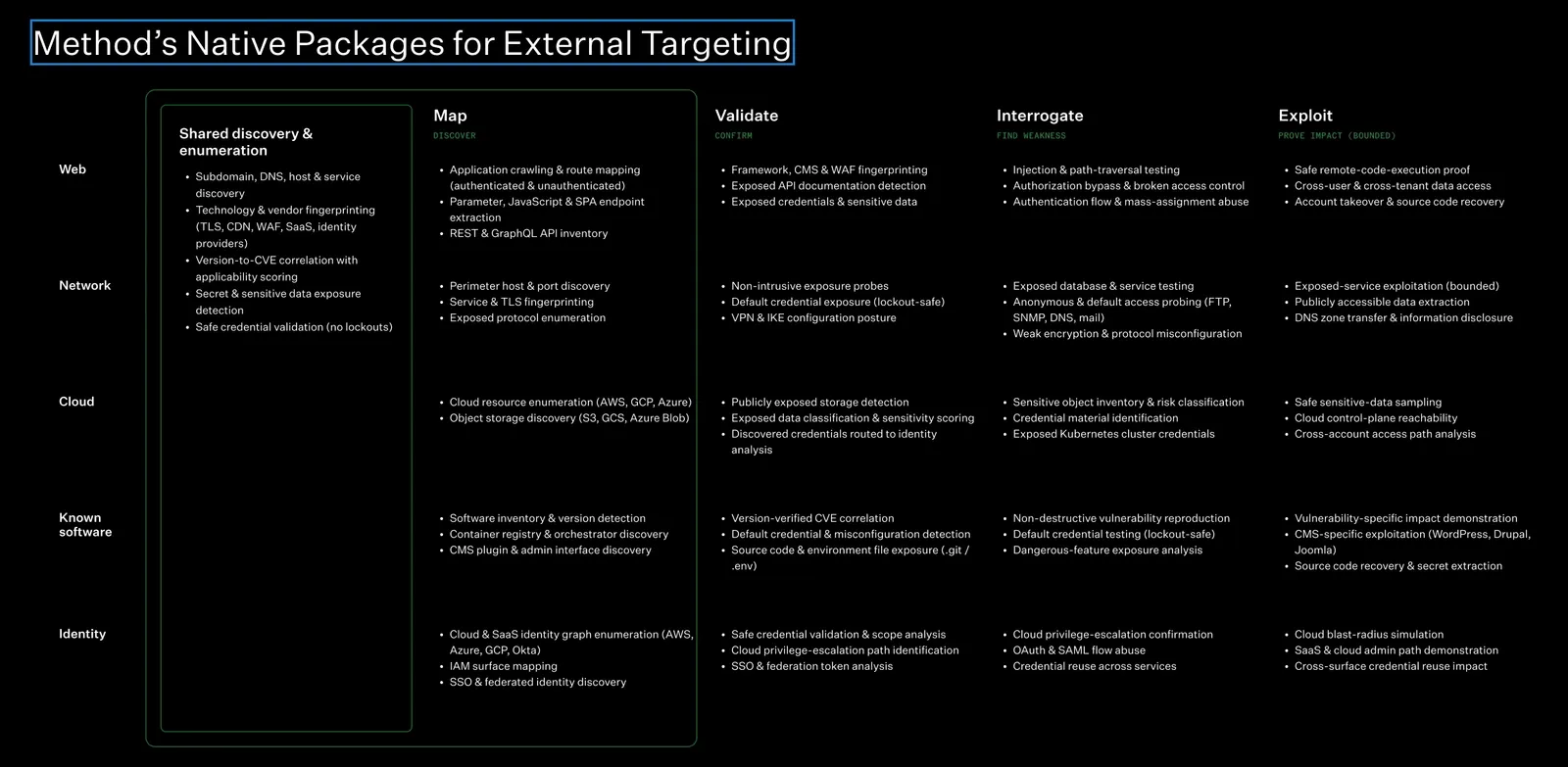
What activities does Method perform during the Map and Validate phases beyond port and web application scanning?
The diagram below summarizes the activities Method performs across the Map, Validate, Interrogate, and Exploit phases for web, network, cloud, software, and identity assessments.
For further reading on Package coverage, see Targeting Packages.
Do I need to provide the associated IP addresses when adding fully qualified domain names (FQDNs) for scanning?
No. Method performs DNS lookups for each FQDN added to the platform, so you do not need to provide the associated IP addresses. However, providing additional identifiers can improve coverage. For instructions on adding FQDNs and IP ranges, see Add seed data.
Should I add full IP ranges and ASNs to expand scanning coverage beyond known IP addresses?
Yes. Adding IP ranges and ASNs that your organization owns and has approved for scanning can help discover assets missing from your current inventory. Method scans the supplied ranges to identify active addresses for further enumeration. Map those ranges to the appropriate Environments so the discovered assets are associated with the correct scope.
For instructions on adding IP ranges as scan inputs, see Create a new Environment.
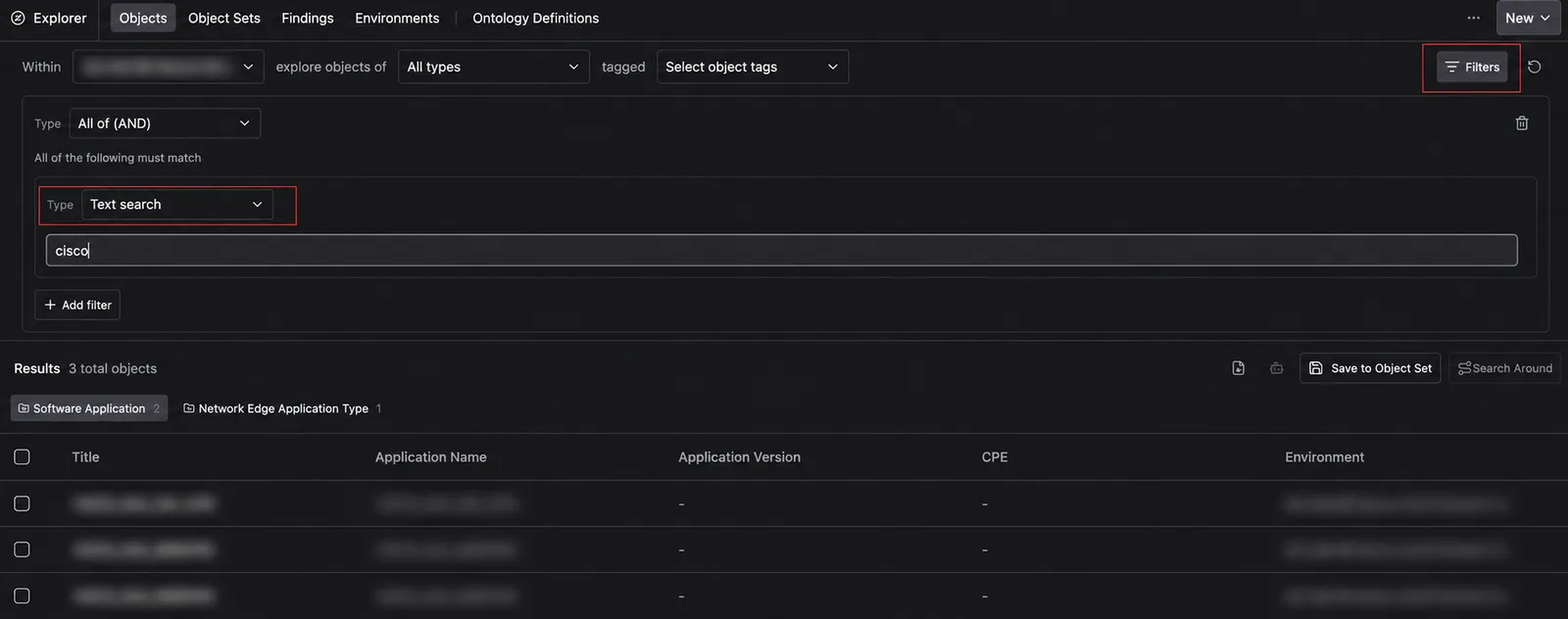
How can I search for assets discovered in an Environment?
Use filters in Explorer to narrow the discovered Objects by Environment and relevant attributes. For example, select an Environment and apply a text filter for “Cisco” to find matching Objects.
The screenshot below shows how to apply a text filter in Explorer.
Scan scheduling · 4 questions
How often does Method rescan assets, and can that frequency be adjusted?
By default, Method scans assets daily and checks the top 100 ports on each device every hour. This keeps the data used by Agents in later phases up to date. Approving scanning on multiple days also helps keep asset information current. Method does not create new Targets for assets that have not been observed within the past seven days. Scan frequency can be adjusted, with the slowest setting scanning each asset at least once a week.
For instructions on configuring recurring runs, see Schedule a recurring run.
Can I restrict scanning to specific days and times, and what schedule does Method recommend?
Yes. You can restrict scanning to specific days and times. However, Method recommends allowing scans to run throughout the day when possible. The platform distributes scans evenly across the approved window, so a full 24 hours gives scans more opportunity to return results while reducing network and platform load.
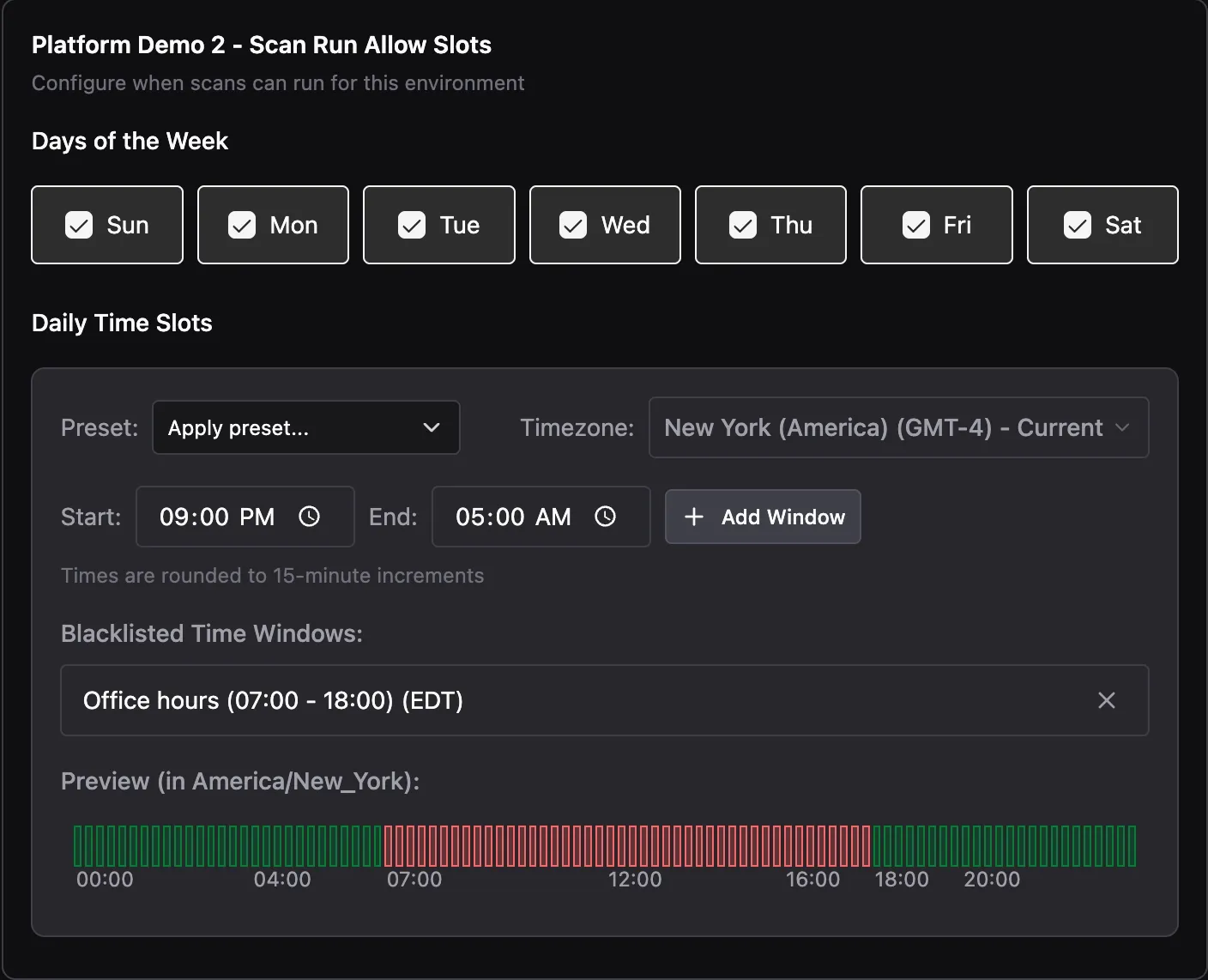
Can I configure scanning windows and blocked times for each Environment?
Yes. You can configure a scanning schedule for each Environment, specifying the days and times scans are allowed to run. You can also define blackout windows to block scanning during specific periods. The same minimum activity window and Environment blackout periods apply to scanning, Pentest, and Compromise.
The screenshot below shows the controls for selecting days, time slots, a timezone, and blocked windows.
Why might scan activity continue after the allowed scanning window ends?
Blackout windows prevent new scanning Tool executions from starting, but do not stop executions already in progress. A scan started during the allowed window may therefore continue after it closes. Short windows and restrictive rate limits can make this more likely.
Scan duration · 2 questions
How long does a scan take for a single IP address or FQDN?
Scan duration depends on the services discovered, the Tools used, and the configured request rate. Individual scanning Tools may finish within a few minutes for a single IP address or FQDN. A complete scan chains multiple Tools together based on what it discovers, so the full workflow can take anywhere from a few minutes to over an hour.
How long does it take to scan an Environment?
A scan can take one to four hours, depending on the number of inputs. When scanning multiple Environments, Method typically scans one to five at a time and sequences the remainder over subsequent days. Results may be available within a few days of receiving approved identifiers, though timing varies by Environment.
Can I set a maximum HTTP request rate for an Environment?
Yes. You can configure an HTTP request-rate limit for each Environment. For example, you can set a limit of 40 requests per second.
Does Method send HTTP or HTTPS requests to target systems during the Map phase?
Yes. Method sends HTTP and HTTPS requests during the Map phase. You can configure a request rate limit for each Environment.
Can scan requests come from multiple IP addresses at the same time?
Yes. Different scans can send requests from different IP addresses at the same time.
How can I identify Method assessment traffic in my logs?
Method scans originate from Method’s IP range, which you can use to identify scan traffic in your logs.
Should I allowlist Method’s source IP addresses for scanning, and how does that affect assessment coverage and realism?
Method recommends allowlisting Method’s source IP addresses to enable deeper coverage of your attack surface and help identify vulnerabilities. Without allowlisting, web application firewalls may limit or block Method’s traffic, reducing assessment coverage.
Allowlisting trades some attacker realism for more complete coverage. If your goal is to test your firewall configuration, Method can configure traffic to come from different egress endpoints, so a user can allowlist one IP range to ensure the assets behind the firewall are challenged, while not allowlisting the other range to ensure the firewall is tested.
Targeting and Agents
What types of network, application, authentication, and system interactions occur during the Pentest phase?
Pentest Agents read the artifacts that the Research Agents produced, builds a series of test surfaces, and deploys subagents in parallel to investigate those test surfaces.
- Application (HTTP/S): crafted requests against parameters the target exposes (query, body, form, header, cookie, and URL-path positions) to confirm injection (SQL, command, template), path traversal, authorization flaws, and similar classes of attacks.
- Authentication: Pentest Agents will attempt to discern whether credentials can be leaked and will test those credentials to see if they are valid. In other networks, Method has observed exposed credentials in both the Research and Pentest phases.
- Network / protocol: Pentest Agents will probe exposed network ports for weaknesses, examining factors such as TLS validity, SSH password-auth exposure, SNMP community/version, LDAP anonymous bind, SMB version, DNS zone transfer (AXFR), IKE aggressive mode. These are protocol interactions to confirm a weakness is present and reachable.
Pentest Agents do not demonstrate impact or chain confirmed vulnerabilities; those activities occur during Compromise. Pentest produces objective evidence that a vulnerability exists and is reachable, including request-and-response evidence and a minimal reproduction for each finding.
For details on native Web Pentest Agent behavior, see Web Agents in depth.
What activities does the Compromise phase perform beyond those conducted during Pentest?
The Compromise phase examines one confirmed finding at a time to demonstrate its potential impact while limiting the scope of its actions. Beyond the activities performed during Pentest, Compromise:
- Re-runs the handed-over proof of concept against the live target as its first action. If it no longer works, the target does not advance.
- Climbs the impact ladder for that one vulnerability class, an ordered list of increasingly severe consequences, up to the ceiling for that class on that target, and no further. The ceiling varies by vulnerability class, but is always limited to the minimum amount of action required to demonstrate impact.
- Executes bounded proof actions. Every action is sorted into a fixed set of action classes before it runs. This classification is what keeps the automated agents safe on a live environment. Details of these classes can be found here: Web Agents in depth
How long does a Pentest Agent run against a Target?
A Pentest Agent typically runs for 15 minutes to an hour per Target, depending on the attack surface. When it has explored all available attack paths without advancing the Target, it marks the Target as Exhausted and stops.
Why aren’t Targets progressing to the Pentest or Compromise phase?
Check the Package’s Stage Policy to see whether the next phase requires operator approval. Assessment windows and application reachability can also limit progress. Review Blocked Targets and their Reports for evidence that a firewall, WAF, or access gateway prevented an Agent from continuing. For cloud assets, confirm that the relevant accounts are connected so the assessment has the required inventory.
See Rules of Engagement for approval controls and Review and act on Targets for investigating blocked assessments.
Agent traffic and limits · 4 questions
What limits apply to request rates, concurrent connections, and network throughput for Pentest and Compromise Agents?
All Method Agents follow the same network rate limiter as the scans if it is established. The amount of traffic generated by each agent is situation dependent.
Is there a limit on the number of transactions an Agent can perform against a Target?
There is no limit on the total number of transactions an Agent can perform against a Target. Configured rate limits control how quickly it sends requests, while Rules of Engagement restrict which actions it can take.
How do traffic patterns vary across Pentest Agents and task types?
Traffic patterns vary by Agent and task because each uses techniques suited to the surface it assesses. Web Agents have been the most commonly deployed to date. Learn more about the different Targeting Packages.
Does the traffic rate adjust automatically based on Target responsiveness or system behavior?
No, the Agents will respect the traffic rate limiter if one is set on the environment.
How does Method determine which newly discovered assets enter the Targeting funnel for Pentest and Compromise?
Newly discovered assets are eligible for Pentest and subsequent phases based on the configured Targeting Packages. Each Package determines which Object types enter the Targeting funnel. For example, the Web Package creates a Target for each Web Application Object. Other Packages cover Network Applications and Cloud Buckets. Agents can use all data within the Environment during their investigations, including Objects without an associated Target.
Method continues to expand Package coverage to support additional Object types and testing activities.
How can I identify which discovered assets are being targeted?
In Explorer, filter for Web Application, Cloud Bucket, and Network Application Objects. Open an Object and select the Target tab to view its associated Target.
What levels of autonomy does Method support?
Operations can run in Manual, Co-Pilot, or Auto mode. Targeting Packages can progress autonomously through configured stages or pause for human approval. Overwatch gives operators control over every keystroke during terminal work. All modes operate under customer-defined Rules of Engagement. See Autonomy modalities.
Can I monitor testing activity and Findings in real time?
Yes. During an Operation, operators can monitor Tool execution and review Findings as they are generated. In Targeting, operators can track Findings and Target status as Agents progress through the workflow.
Evidence and reporting · 3 questions
What evidence does Method capture during Agent and Tool execution?
Method records Agent and Tool activity, including commands and outputs, for review and reporting. For more information, see Operation reporting.
Does Method provide remediation guidance?
Yes. Method includes remediation guidance with Findings, and Agent investigations can recommend next steps. Reports include Finding details and guidance to support remediation. See Findings.
Can Method reports be customized and exported?
Yes. Method can generate reports from Agent Findings and Operations. Reports can include severity, affected assets, remediation guidance, and supporting evidence. Teams can edit reports, use templates for consistent reporting, and export reports as PDFs. For instructions on editing and exporting Operation Notes, see Take Operation notes.
Security and governance
What certifications and authorizations does Method hold?
Method has achieved SOC 2 Type II compliance and FedRAMP High authorization. Method is also pursuing CMMC certification and DoD Impact Level 5 (IL5) authorization.
What limits apply to Agent activity?
Destructive actions, including mass deletion, dropping database tables, emailing real users, and modifying billing, are never permitted, even with operator approval. If an Agent determines that such an action is possible, it documents the risk without performing the action, as described in Web Agents in depth. Objects on the No Strike List are excluded from all automated Research, Pentest, and Compromise activity, regardless of stage policy. Agents cannot change their own scope or Rules of Engagement. Scope changes must be made by an operator.
How much data can an Agent read to demonstrate access to another account’s data?
An Agent reads no more than 10 records at each step to demonstrate access to another account’s data. It uses this small sample to confirm access without downloading or copying the full dataset.
For the native Web Compromise Agent’s data-sampling limits, see Web Agents in depth.
What actions can Pentest and Compromise Agents perform on target systems?
The actions an Agent can take depend on its Package and Rules of Engagement. For native Web Agents, a Research Agent may create a test account through self-service registration when no additional controls prevent it.
A Web Compromise Agent can read data and modify its own test-account state, reverting changes where possible. Changes to another account are limited to test accounts the Agent registered itself, never customer data. Creating persistent state, such as a new administrator account, requires explicit operator approval. To demonstrate command execution, it runs exactly one benign, read-only command, such as whoami. Destructive actions are never permitted, even with approval.
For further reading, see Web Agents in depth for these action limits and Rules of Engagement for approval controls.
Do Agents simulate attacks or perform real actions?
Agents perform real actions, limited to what is needed to demonstrate potential impact. If an Agent determines that a destructive action is possible, it documents that potential impact based on the evidence collected without carrying out the action. See Web Agents in depth for the native Web Compromise Agent’s prohibited-action policy.
Authentication and credentials · 7 questions
Could Method Agents interact with active user sessions?
It is possible, but unlikely. Agents use their own test identities when provided rather than real user sessions. If an Agent discovers an exposed credential, it may test whether the credential provides access to other parts of the system. This carries similar risks to a human penetration tester testing the credential.
Can Pentest or Compromise Agents use administrative or service-account credentials?
Credential-related Triggers identify potential authentication weaknesses, such as weak or default credentials and exposed SSH password authentication. When a credential is found, a Pentest or Compromise Agent may test whether it is valid and active, subject to the Agent’s permitted actions and Rules of Engagement.
How do Agents handle exposed authentication tokens, SSO sessions, and API credentials?
Research Agents identify and tag exposed credentials and secrets in the material they collect. Pentest Agents confirm the exposure as a Finding and may test what those credentials can access. Compromise Agents use confirmed credentials to demonstrate impact, within the action limits for the relevant vulnerability class.
Could Method Agent activity cause account lockouts?
Account lockouts are possible, but Agents are designed not to spray credentials across user accounts.
Could Method Agent activity terminate user sessions or reset credentials?
No. Agents do not terminate user sessions or trigger credential resets.
Can Agent activity cause authentication failures or trigger MFA prompts?
Yes. Authentication failures and MFA prompts can occur during Agent activity, as they can during a standard penetration test.
Can Agent activity trigger blocking or quarantine by security products?
Yes. Security products may block or quarantine activity during an assessment, as they might during a standard penetration test.
Can Agents use evidence or controlled testing to demonstrate business impact without performing the full attack on a production system?
Yes. Agents can use evidence collection, screenshots, audit logs, access checks, proof of acquired privileges, simulated execution, or controlled emulation to demonstrate business impact. They go only as far as needed, and your operators retain control over how far a compromise is taken.
How does Method demonstrate impact while minimizing operational risk?
Examples include:
- Use indirect evidence. Demonstrate SQL injection through changes in response timing rather than retrieving real database records.
- Separate confirmation from exploitation. Permission to confirm a vulnerability does not automatically authorize demonstrating its full impact. Stage Policy controls whether approval is required before the Compromise phase.
- Stop once impact is established. Demonstrate enough to determine the vulnerability’s severity without taking further unnecessary actions. See Web Agents in depth for how native Web Compromise Agents limit their actions.
- Require approval for higher-risk actions. Configure Risk Axes to require approval for restricted actions that could affect system availability.
How does Method address variability in AI outcomes and reduce the risk of hallucinations?
Method uses several measures to reduce variability and the risk of hallucinations:
- Frontier models. Method uses frontier AI models to improve the reliability of results and reduce the risk of hallucinations.
- Scoped sessions. Agents work in smaller sessions, and subagents handle narrowly scoped tasks in their own sessions.
- Structured data. Agents can act only on Objects in the platform’s Ontology, using identifiers provided to the platform or collected by a Tool. See Ontology-based enforcement.
- Rules of Engagement. Policy rules and the No Strike List are evaluated programmatically to block tasks that violate them. Agent Policies can also require approval for certain Tool actions.
Customer data · 2 questions
How does Method isolate and encrypt customer data?
Method uses a single-tenant architecture with dedicated AWS accounts, compute, and storage resources for each customer. Customer data stored in Amazon RDS and Amazon S3 is encrypted at rest using AES-256, with Method-managed keys by default. Data in transit across public and AWS service endpoints is encrypted using TLS 1.2.
Where is customer data stored, and how are retention periods determined?
By default, customer data is stored in AWS U.S. East regions. Retention periods are defined in the agreement between Method and the customer.
Security documentation · 3 questions
What security testing reports are available for Method’s AI components?
Method regularly conducts penetration testing of its platform, including its AI components, using internal security engineers, embedded operators, and contracted third-party penetration testers. AI components are included within application testing rather than documented in a separate AI-specific testing report.
Executive summaries are available through the Method’s Trust Center.
Where can customers review Method’s security policies and controls?
Customers can review Method’s documented security policies and controls through the Method Trust Center.
Does Method conduct disaster recovery testing, and are the results available to customers?
Yes. Method performs disaster recovery testing annually. Results are available to customers through the Method Trust Center.
Access and permissions
Does Method support authorization as well as authentication, and how are access permissions managed?
Yes. Method supports both authentication and authorization. Its access-control model uses relationship-based access control (ReBAC). For details on roles and permissions, see the Security Administration Guide.
Can I configure default viewing and editing permissions for Environments?
Yes. You can configure default Environment permissions in the Administration panel, choosing which groups receive viewing or editing access. You can change the default groups or add your own. These changes do not affect platform administrators’ access.
Does Method support single sign-on through SAML or OIDC?
Yes. Method supports single sign-on through SAML or OIDC, as well as authentication with local credentials.
Integrations
Why does Method use cloud connectors to scan cloud assets?
Method supports black-box scanning using FQDNs, IP addresses, or CIDR ranges, and white-box scanning using authenticated cloud connectors.
Cloud resources change frequently: IP addresses can be reassigned, instances terminated, and storage buckets deleted. A cloud connector provides the account context needed to keep scanning limited to assets you own or control, rather than scanning previously discovered IP addresses in isolation.
The AWS Inside Out Enumeration Task uses Method’s AWS cloud connectors to retrieve a current inventory immediately before scanning, avoiding IP addresses that have been reassigned to another customer. The Task collects both internal cloud information and externally hosted assets.
For AWS connection setup and Environment delegation, see Integrate with AWS.
How can I connect multiple AWS accounts to Method without configuring each connection manually, and do I need to create IAM roles or external IDs beforehand?
Method provides CloudFormation templates and Terraform modules to automate IAM role creation and Cloud Connection registration across multiple AWS accounts. You can deploy across an AWS Organization or selected Organizational Units, without adding each connection manually.
The deployment generates a unique external ID during registration and creates the IAM role as part of the setup, so you do not need to create the role or obtain its external ID beforehand.
For setup instructions, see Integrate with AWS using CloudFormation or Integrate with AWS using Terraform.
Does Method provide an API and Python SDK?
Yes. Method provides a programmatic API and Python SDK for automating platform workflows and integrating Method with other systems.
Does Method integrate with Tenable?
Yes. Method provides an out-of-the-box integration with Tenable to bring vulnerability data into the platform.
How can I receive Method updates in external systems?
Method supports built-in integrations with Slack and Microsoft Teams, as well as HTTP webhooks for forwarding notifications to other systems.
The generic JSON webhook sends an alert when a Target moves to a new stage. The alert includes the Target ID, which your integration can use with the Get Target endpoint to retrieve additional details and forward them to email or another system.
For configuration instructions, see Set up a generic webhook.