Jackal C2
How Jackal security agents are designed, deployed, and controlled.
Overview
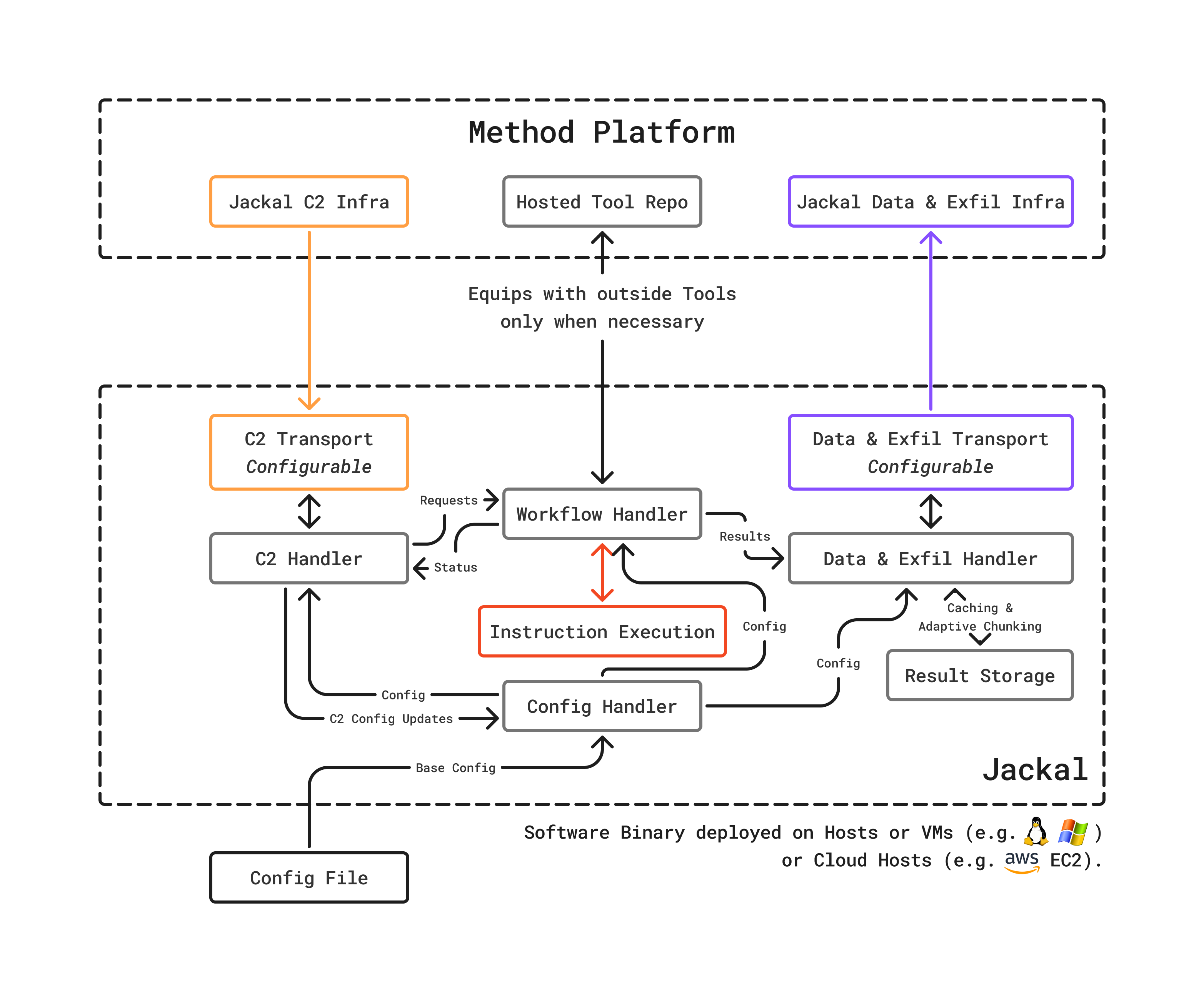
Jackal is Method’s security agent: a minimalist, runtime-configurable agent designed for flexibility across cloud, on-premises, and air-gapped environments. Its command and control (C2) infrastructure manages agent lifecycle, task assignment, data upload, and exfiltration.
Its architecture is designed to be expanded to use cases and functionality like agent-to-agent relay, ephemeral lifetime, and bespoke data exfil channels, to name a few.
Design philosophy
Jackal is intentionally unlike traditional security agents. Rather than shipping with a large footprint of built-in capabilities, Jackal follows a minimalist design:
- No built-in security capabilities: Jackal does not ship with scanners, analyzers, or security logic. It is a runtime that receives and executes instructions.
- Self-equips at runtime: When assigned a Tool to execute, Jackal fetches the required binary, Docker container, or script. This means the agent’s capabilities are determined by the platform, not by what was installed at deployment time.
- Living off the Land (LotL): For certain operations, Jackal uses native utilities already present on the host rather than deploying additional tooling. This is particularly useful for red team exercises and environments where minimal footprint is critical.
C2 infrastructure
The C2 layer manages the relationship between the platform and deployed Jackals:
Task assignment
The platform assigns work to Jackals based on environment configuration, tool requirements, and agent availability. Jackals poll for instructions, execute them, and report results.
Data upload and exfiltration
Tool outputs flow back to the platform through secure channels. Data is written to the Ledger and materialized into the Ontology.
Agent lifecycle
Jackals can be provisioned, monitored, and decommissioned through the Administration application. The platform tracks each Jackal’s status and assigned environment.
For a deployment guide, see Install and configure a Jackal.

