

Operations
Plan and execute security operations, from AI-assisted red teaming to multiplayer CLI engagements.
What is an Operation?
An Operation is a coordinated sequence of security actions performed against a target. Operations can be investigative or offensive in nature, performed with or without initial access, and can contain multiple parallel streams of work. Use them for red team missions, adversary emulation exercises, training, or live investigation of your environments.
Method provides two execution surfaces for Operations: Operator (a visual workspace) and Overwatch (a CLI for local tooling). Both live inside the Operations application and share the same mission context: Targets, discoveries, notes, AI assistance, and Reports.
Choosing an execution surface
Operator and Overwatch are designed to support different ways of performing offensive operations:
- Operator: Use a visual graph, Method Tools, Rules of Engagement, Object Watch, and Operator AI to plan and execute the Operation inside the platform.
- Overwatch: Use your own terminal and local tooling while Method records the session, streams activity to analysts, extracts Objects, and keeps the operation ready for review and reporting.
Operator
Operator is the primary workspace for running Operations. It serves as an IDE for Security Engineering and Offensive Engineering workflows, with Tools, Ontology data, and AI at your fingertips.
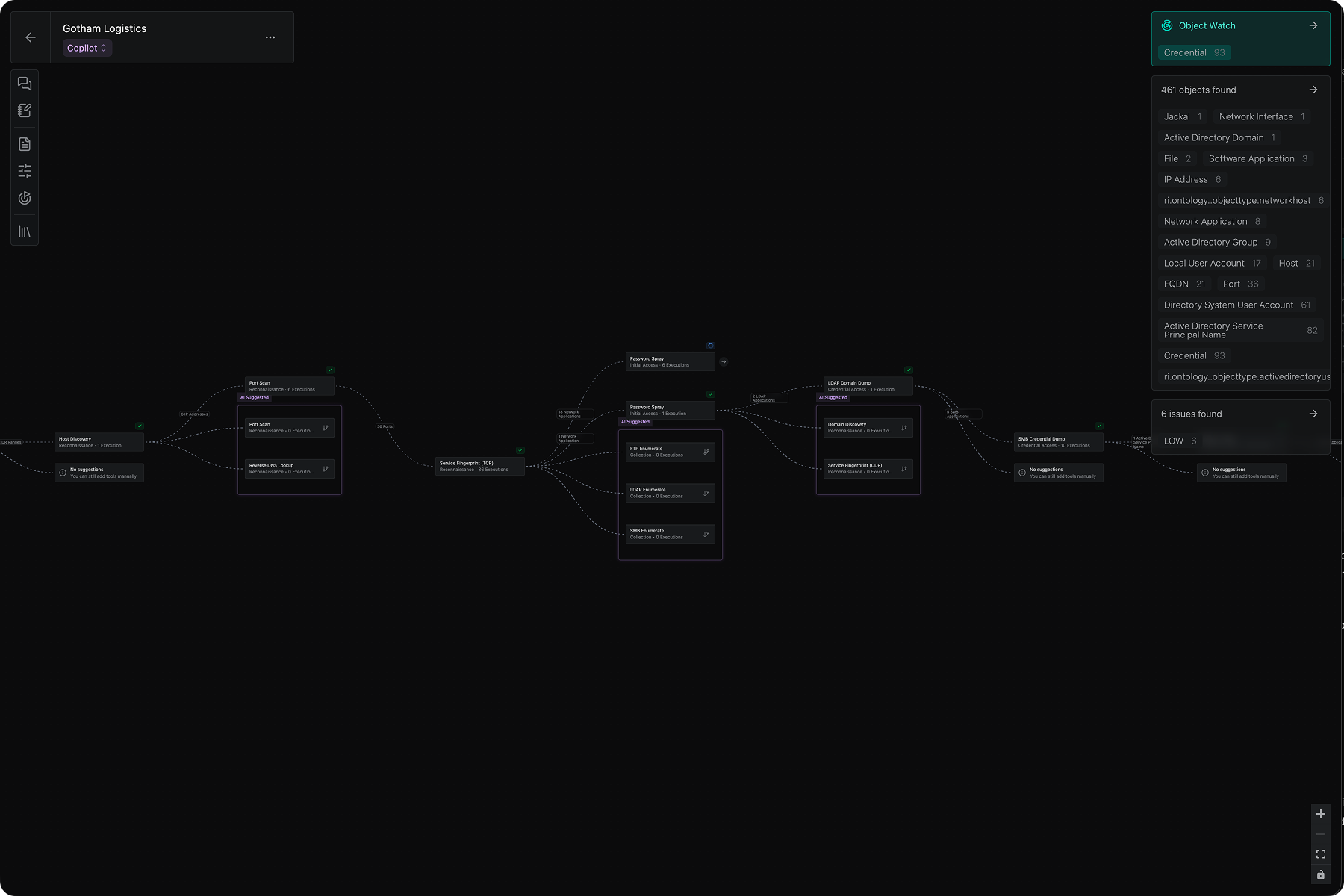
The workspace
The Operator workspace is built around a central graph canvas:
- Left panel: Contains AI chat, Operation objectives, Rules of Engagement, adversary intelligence, and the complete Tool Library
- Central graph: Visualizes the steps taken in your operation. Nodes represent Tool executions; edges show data types flowing between them. For Operations in a target network (not the open web), switch tabs to see a Network Map of the target network.
- Right panel: Objects and Findings discovered. Select a node to filter to that step’s results, or deselect to see the full operation lineage
Operating modes
Operator offers three modes:
- Manual mode: Fully operator-driven. No AI suggestions for tool executions, but you can still use chat with AI for questions and analysis.
- Co-pilot mode: Human-in-the-loop, AI-assisted operation. You receive AI-suggested tool recommendations based on the mission objective, recent findings, environmental context, and adversary intelligence. Accept or decline each recommendation before execution.
- Auto mode: The system runs completely autonomously within pre-defined guardrails set by the operator.
You can learn more about Co-pilot and Full Auto mode in Operator AI.
Adversary emulation
Operations can include Adversaries, created from uploaded adversary intelligence, to power AI-driven adversary emulation. When an Adversary is selected, Operator AI suggestions reflect how that adversary would behave against your targets. You can chat with the Operation AI to learn about how the adversary would think about your targets.
Rules of Engagement
Operations support configurable guardrails: No Strike lists, restricted tool executions, and operational risk controls that enforce safety boundaries during execution.
Object Watch
Declare specific Object Types of interest; the system passively monitors for them and alerts you when they are discovered during an operation.
Method Tools
Operator leverages Method’s full suite of tools. You can explore them in the Tool Library, in the left panel. As you progress through your operation, only the tools that are applicable to the data you have discovered are suggested.
For a step-by-step walkthrough for using Operator, see Run your first Operation.
Overwatch
Overwatch is the terminal-native way to run operations. It is a cross-platform CLI for running operations locally using your own tools, while integrating with the full Method platform.
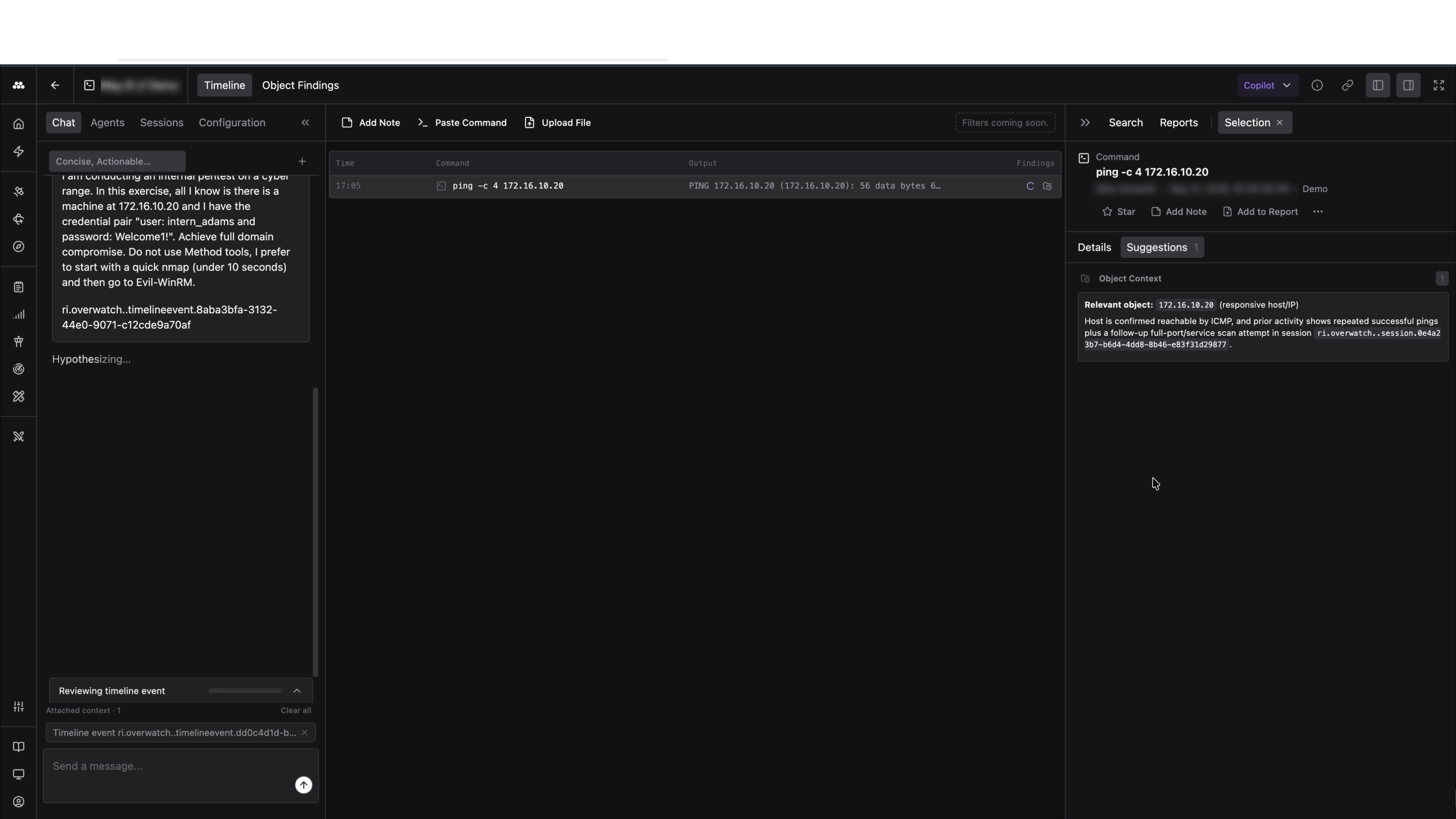
Session recording
Overwatch records commands, outputs, and relevant metadata from the terminal. You can continue using your normal shell and tools, and Overwatch will capture the activity for review, collaboration, and reporting.
Entry paths
Start a standalone Overwatch session from New > Overwatch session when the engagement begins in the terminal. Start Overwatch from inside an existing Operation when the terminal session is part of a larger Operator-led workflow.
Collaboration
Multiple people can join the same Overwatch session from their own terminals. Analysts can observe from the platform, add notes, contribute commands, review Object Findings, and use Chat for AI-assisted guidance without taking control of the terminal.
Platform workspace
When you open an Overwatch session in Method, you see a dedicated workspace for the live terminal feed. The workspace includes the Timeline, Object Findings, Chat, analyst notes, command handoff, file uploads, and Report generation.
The Timeline action bar supports three quick contributions:
- Add Note: Attach a freeform note to the timeline
- Paste Command: Send a suggested command into the session for the person at the terminal to review
- Upload File: Attach any file as a source to the session
Report generation
Use Overwatch’s timeline history, accepted Objects, starred commands, and notes to generate a Report from the session.
For a full overview of Overwatch capabilities, see Overwatch. For installation and setup, see Run an Overwatch session.