

Tools
Predefined security actions for operators and Agents, with inputs, execution, and results you can review.
What is a Tool?
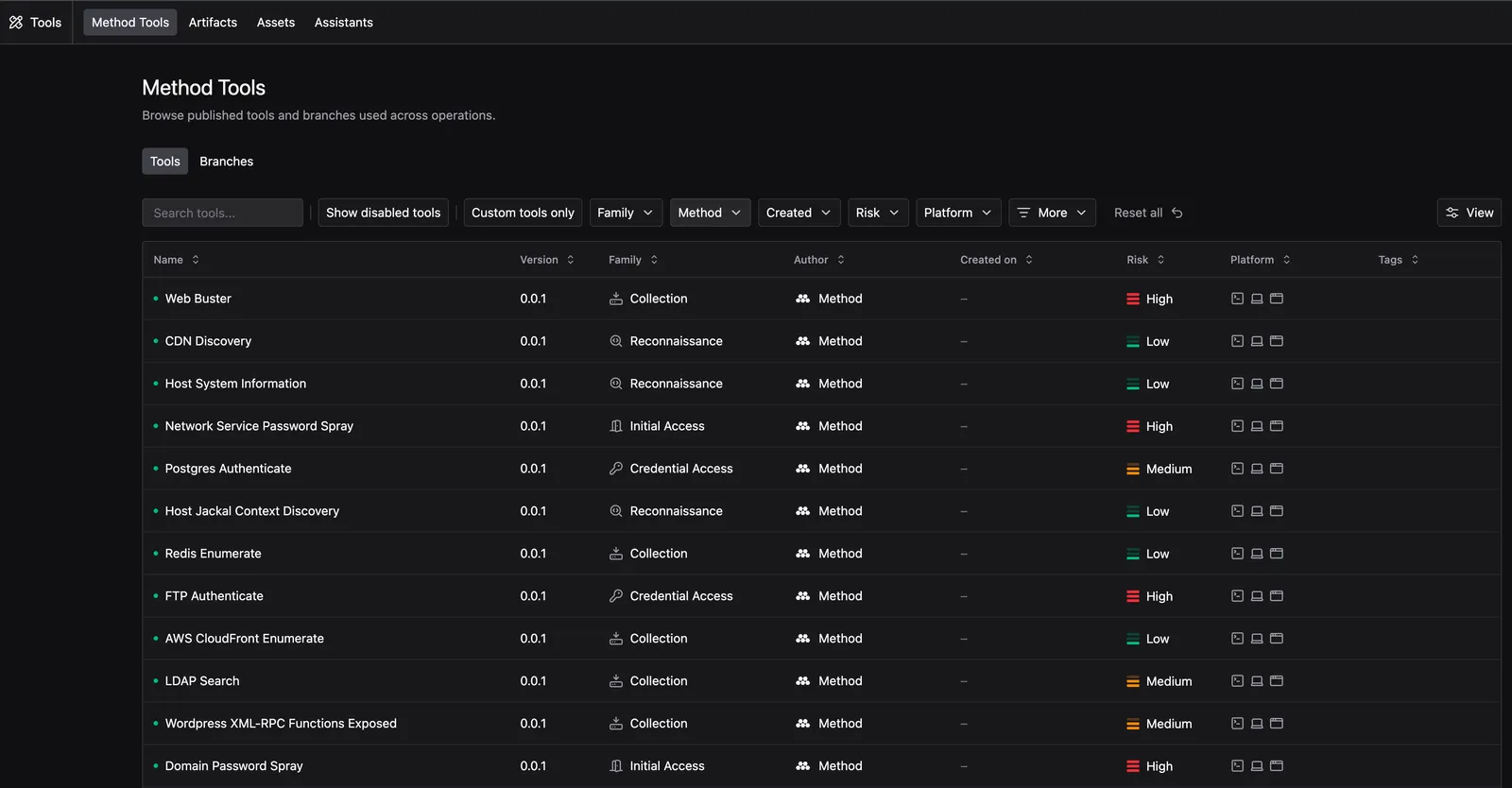
A Tool is one atomic security action in Method. A Tool wraps, for example, a single scan, lookup, or enumeration, so the platform can run it with typed inputs and understand what it found.
Large integrations like AWS or Okta are represented as many small Tools, such as “Enumerate AWS EC2 Instances” and “List IAM Roles.” Each Tool defines a specific capability that operators and Agents can use.
Bring your own tradecraft
Security operations in critical environments demand precise control over actions on live systems. An unexpected command can interrupt essential services, alter sensitive data, or reach beyond authorized scope. AI Agents can guide investigations and interpret findings, but their ability to act should be bounded by predefined capabilities and enforced Rules of Engagement. Decisions about what an Agent may do should rest on explicit controls, rather than the model’s judgment alone.
Method uses Tools to define those capabilities before they are used. Authors specify what each Tool can do, the inputs it accepts, and the choices available to operators and Agents. Its behavior can be reviewed, tested, and authorized, giving Agents room to pursue an investigation within boundaries the team understands and controls.
Bring Your Own Tool (BYOT) lets teams expand those capabilities with their own tradecraft, turning scripts, command-line utilities, and custom workflows into reusable Tools in Method. Tools can take Ontology Objects as inputs, using their properties and relationships alongside parameters such as strings, numbers, and options.
Authors validate their implementation and publish a version for operators and Agents to use. Tools define the work assigned to Jackals for execution, and their results can become Ontology Objects, relationships, and supporting evidence. This lets teams build capabilities for their specific missions and connect them into broader investigations, using what one Tool discovers to guide the next action.
Key terms
How Tool execution works
When an operator or Agent runs a published Tool, Method passes the selected parameters, Ontology Objects, and Jackal capabilities to its Compiler. The Compiler builds workflows, which Method assigns to the selected Jackal for execution.
The Jackal returns output as Signals, which the Processor interprets to produce Ontology Objects, relationships, and supporting evidence. For Tools with unstructured output, authors can optionally add AI preprocessors to extract structured data before it reaches the Processor. The original output remains available in either case.
Compiler types
The Compiler turns a Tool’s inputs into work for a Jackal. BYOT supports three approaches:
AI preprocessing
AI preprocessing is an optional step that converts unstructured Tool output into structured data. Authors can create assistants with their own prompts, instructions, and expected JSON output schema, then reference those assistants in the Tool configuration.
For each configured output step, Method sends the raw output to the referenced assistant, which extracts information into the JSON structure expected by the Processor. The Processor receives those results alongside the original output and preprocessing status, checks the data, and creates the corresponding Ontology Objects. Tools that already produce the expected structured output can skip preprocessing.
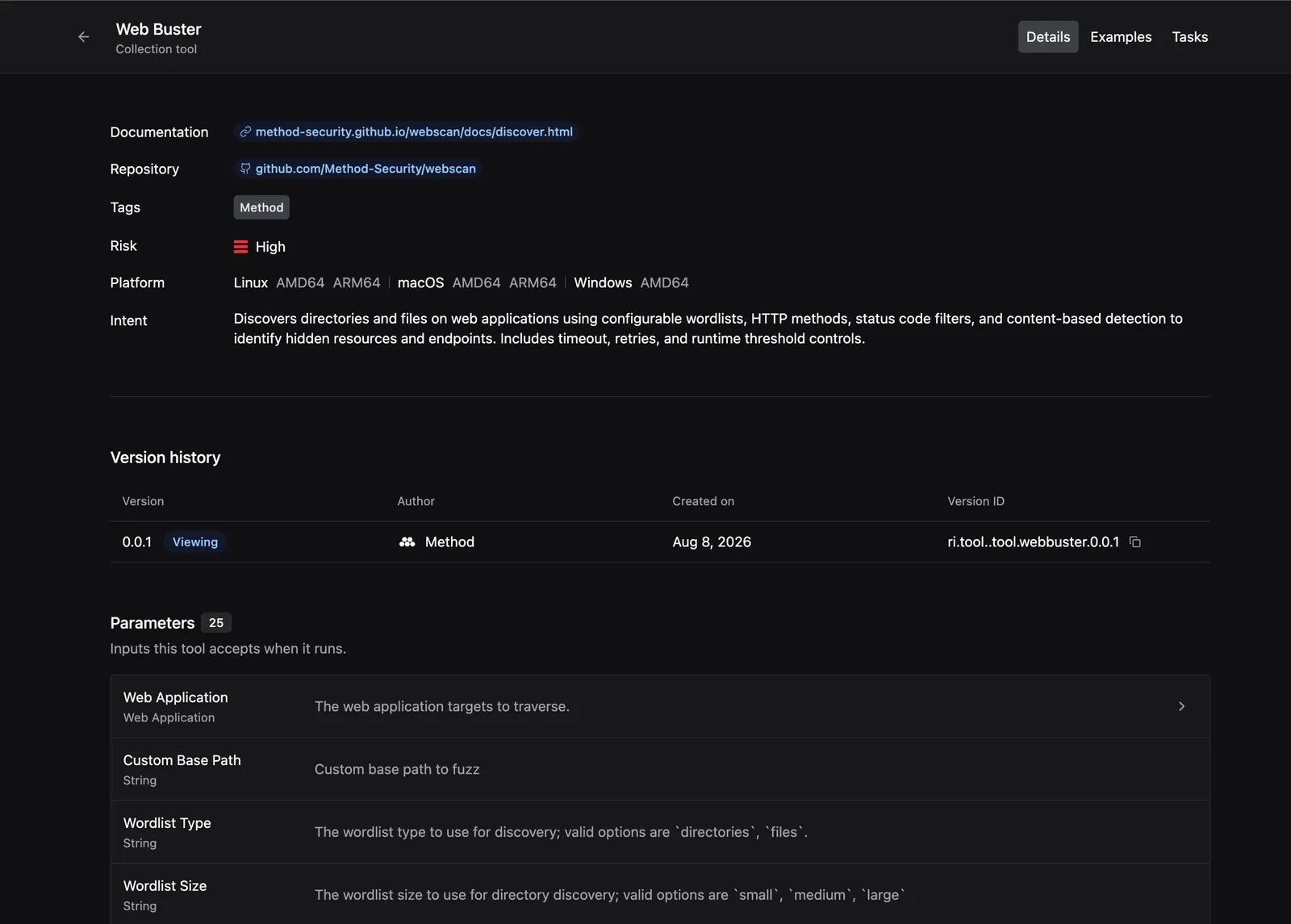
Tool details view
Select a Tool to view the following information:
- Details: Tool properties, parameters, required inputs, associated links, and the types of Objects it creates
- Examples: Sample use cases and representative executions showing how the Tool is used in Operations
- Tasks: Existing Tasks that use the selected Tool
Tool authoring FAQs
How do Rules of Engagement and Risk Axis enforcement apply to BYOT?
BYOT Tools run through the same graph enforcement path as built-in Tools. They are subject to the step’s bound Rules of Engagement, including Tool access policy and no-strike scope.
Risk Axis enforcement applies when the Compiler response includes triggered Risk Axis values. Authors define the Tool’s overall riskLevel; they do not currently set Risk Axis values directly through the public authoring interface. The Compiler produces CLI arguments, Script replacements, or Courier workflows.
Where can BYOT Tools run?
A Courier-capable Jackal can execute Courier workflows and must support the actions the Tool requires. This applies to both cloud and deployed Jackals. See Courier compatibility for how workflows and Jackal capabilities fit together.
Courier-capable Jackals can appear in cloud listings while compiling as deployed-style execution targets. Choose a Jackal based on the Tool’s required capabilities as well as where it runs.
Can I bring my existing red team toolkit?
Yes. BYOT supports a mix of compiled tools and scripts, including existing red team utilities. Package each capability so Method can execute it consistently: define the command, supported operating systems and architectures, parameters, target mapping, and the processing needed to turn output into Objects or findings.
Once registered, those Tools run through the same controls as built-in Tools, including Rules of Engagement, no-strike scope, Tool access policy, and Risk Axis enforcement when the Compiler response provides Risk Axis values.
Upload the third-party tool you want to use as an Artifact.
How does validation work?
Validation checks whether Method can understand the Tool definition, compile the command or workflow, and parse sample output into Ontology data.
For realistic feedback, run the published Tool in Operator and inspect the workflow result for errors, output, and the resulting Objects and relationships. This exercises the actual execution path. The authoring guide covers preparing that test from the editor and using its results to iterate.
Can I change flags or parameters on the fly?
Yes, if the Tool exposes those flags as parameters. Operators can adjust supported parameters at run time, while the definition controls which options are available and how they map into the final command.
Set defaults in the Tool definition or Compiler code. Tenant-level and Environment-level overrides of those defaults are not part of this workflow.
Guides and use cases
Follow Create and publish a Tool for the product workflow. See Operator-defined Tools for the use cases and examples, or the Tool authoring reference for implementation details.