

Targeting
How Method identifies, researches, and tracks attack paths across your environment.
What is Targeting?
Targeting is Method’s mechanism for identifying and pursuing real attack vectors: the assets the platform believes an adversary could exploit. It is distinct from Findings, which track known vulnerability classes (CVEs, misconfigurations, exposures). A Target is selected because it represents a plausible attack path, not just a known risk pattern.
Where Findings answer “what is wrong,” Targets answer “what an adversary can exploit.” Method’s Agents work a Target from initial selection through Research, Pentest, Compromise, and Remediation, with controls you define over how far automation proceeds at each status. See Review and act on Targets to learn how to triage them at each stage.
How Targeting works

Method’s Targeting engine moves discovered Objects through the pipeline below. Each phase narrows the population and increases confidence that what remains represents an attack path.
Map
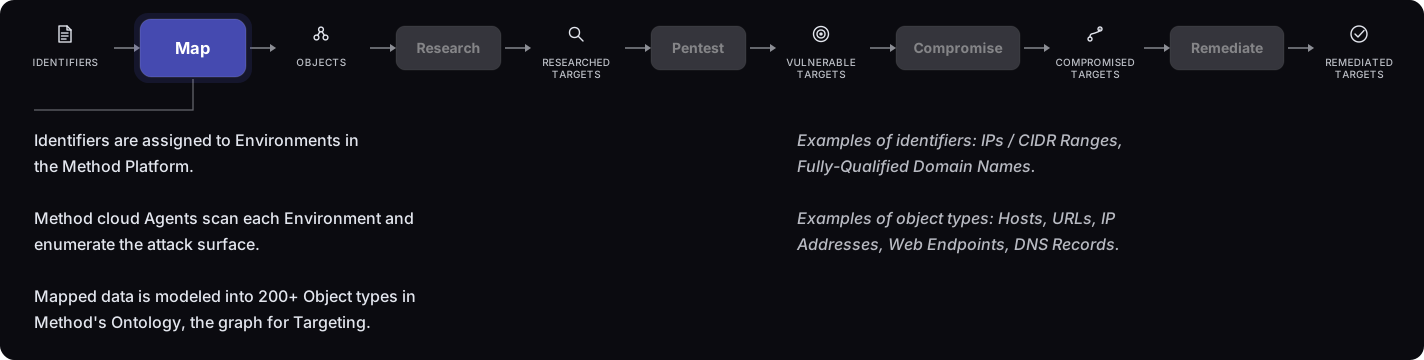
You provide seed data (FQDNs and CIDRs) and connect integrations. Method scans each identifier continuously, models discoveries into 200-plus typed Object types in its cyber Ontology, and hydrates the Ontology as new data arrives. This is the raw material the rest of the pipeline acts on.
Objects
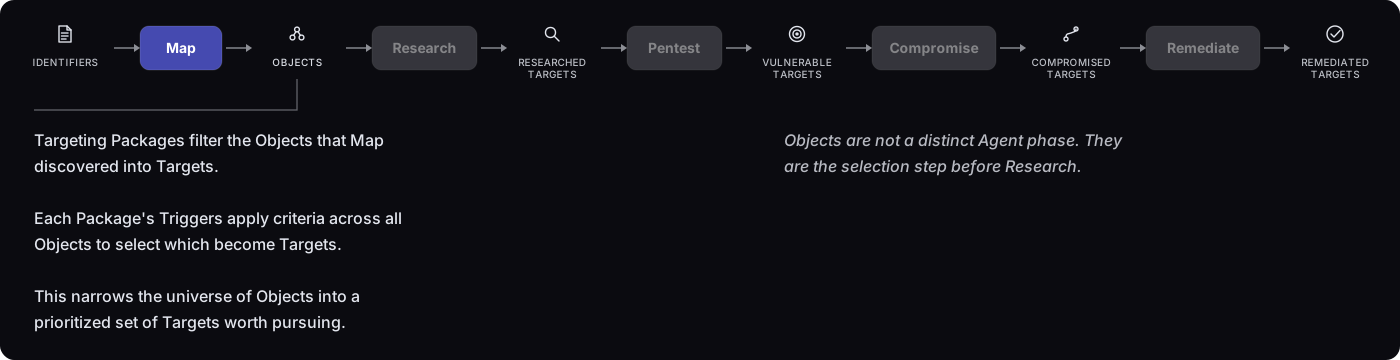
While Objects are not a distinct Agent phase, they are the filtering step between discovery and Research: you deploy Targeting Packages, and their Triggers apply criteria across the Objects that Map discovered to select which ones advance to Research. This turns a large universe of Objects into a prioritized subset of Targets worth pursuing.
Research
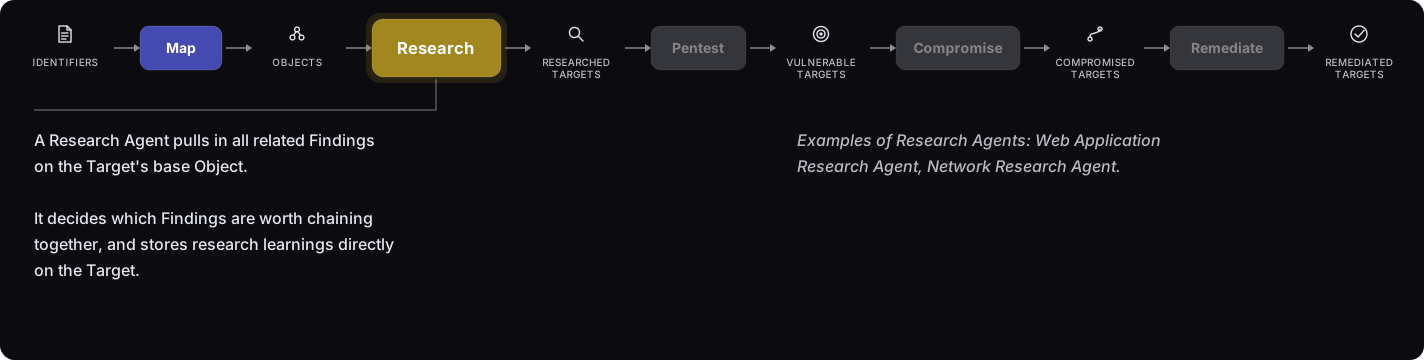
A Research Agent pulls in all related Findings on the Target’s base Object, decides which are worth chaining together, and stores its research learnings directly on the Target. Targets that hold up move to Researched; those that do not are marked Invalidated and removed from the active pipeline. This phase filters false positives at scale before any offensive action runs.
Pentest
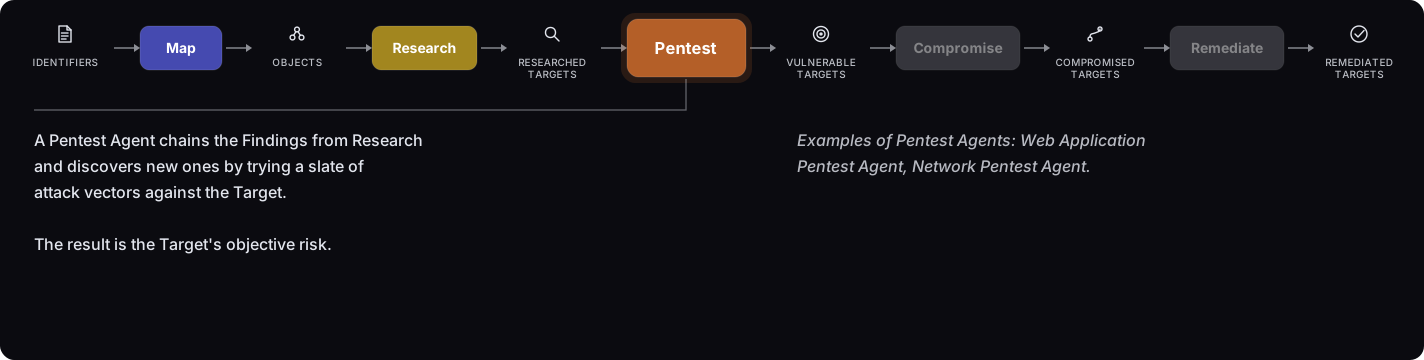
A Pentest Agent chains the Findings surfaced during Research and discovers new ones by trying a slate of attack vectors against the Target, operating with a human in the loop and under the Rules of Engagement you set. The result is the Target’s objective risk. Targets that clear this phase move to Vulnerable.
Compromise
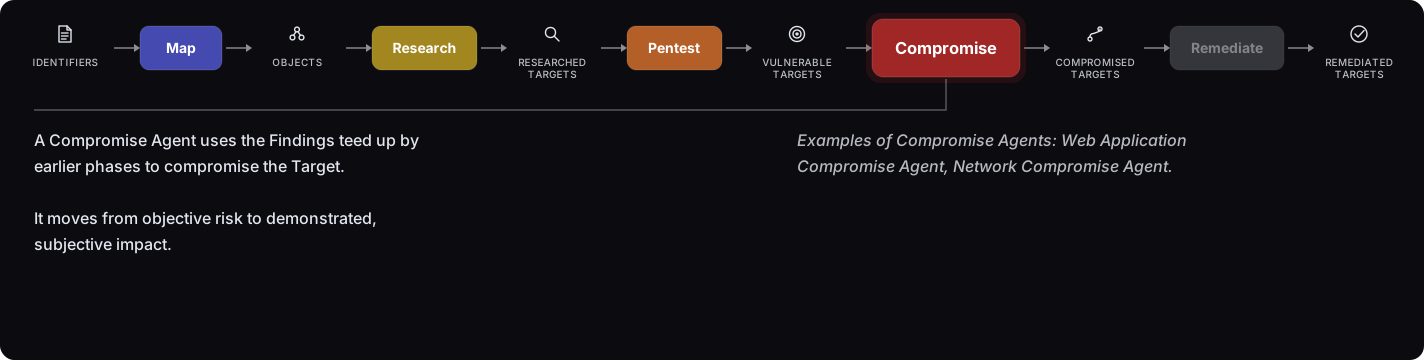
A Compromise Agent uses the Findings teed up by earlier phases to compromise the Target, moving from objective risk to demonstrated, subjective impact: proof that the Target’s Confidentiality, Integrity, or Availability has actually been compromised, within a bounded blast radius and always within your defined Rules of Engagement. Targets that are successfully compromised move to Compromised, and Method produces a Report with evidence for remediation.
Remediate
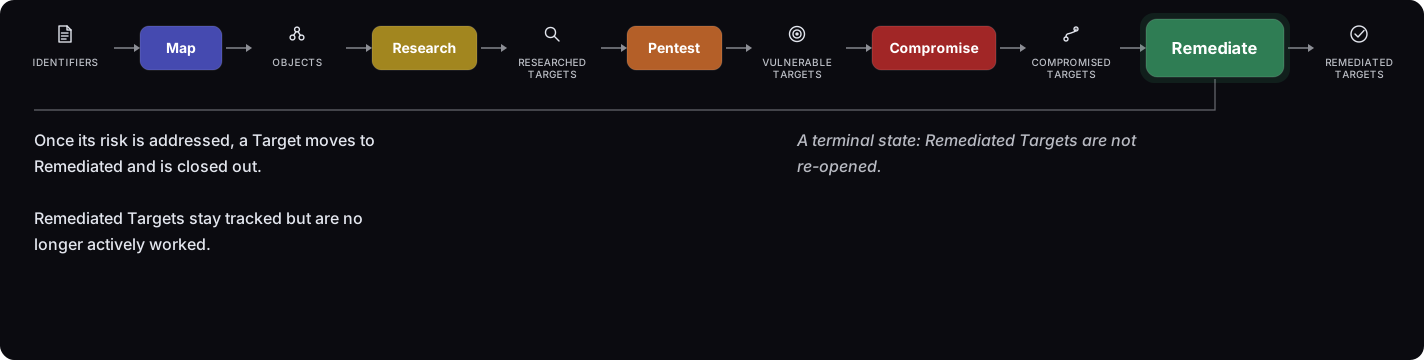
Once a Target’s risk is addressed, it moves to Remediated and is closed out. Remediated Targets remain tracked but are no longer actively worked. Remediated is a terminal state: a Remediated Target is not re-opened.
Compromised Targets
A Compromised Target is a Target Method has taken all the way to demonstrated impact: the Compromise phase carried a confirmed vulnerability through to proven consequence rather than leaving it as theoretical risk. It represents the complete chain from initial Target through confirmed Pentest and demonstrated Compromise, with the evidence the platform collected along the way.
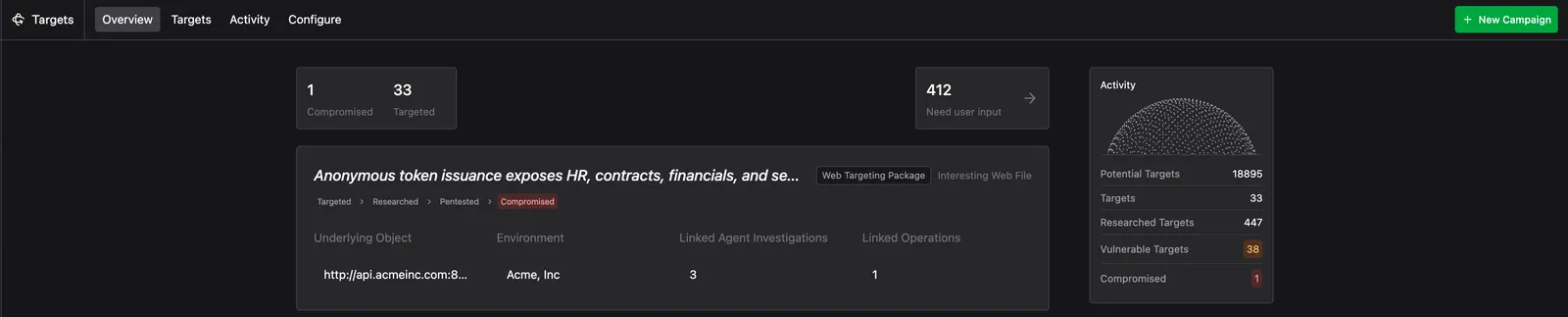
Each Compromised Target captures the full record: the path taken, the evidence gathered, and the Report the Compromise Agent produced. Use Compromised Targets to prioritize remediation, share evidence with stakeholders, and track what has been demonstrated versus what is still being pursued.
Targets
The Targeting funnel
Targets move sequentially through a defined set of statuses, each reflecting how far Agent work has progressed on that asset. A Target holds one status at a time and advances as it clears each stage.

Vulnerable versus Compromised marks a shift in the kind of risk a Target represents. Vulnerable is objective risk: a Finding exists on the Target, confirmed and reproducible by Pentest. Compromised is subjective risk: the Compromise Agent has gone further and demonstrated real consequence, proving that the Target’s Confidentiality, Integrity, or Availability was actually compromised.
Blocked is not a status but a flag that can appear at Researched, Vulnerable, or Compromised. A blocked Target is waiting on user input before work can continue. That might be an Agent that needs direction on how to proceed, or a Rules of Engagement gate that requires human approval. Blocked Targets surface on the dashboard under Need User Input.
Exhausted is a related flag that can appear at the same stages. An exhausted Target is one where the Agent has run through the actions available to it at the current stage without advancing the Target, and has stopped rather than continuing. Method surfaces exhausted Targets separately from blocked ones so you can review them and decide how to proceed.
Configure
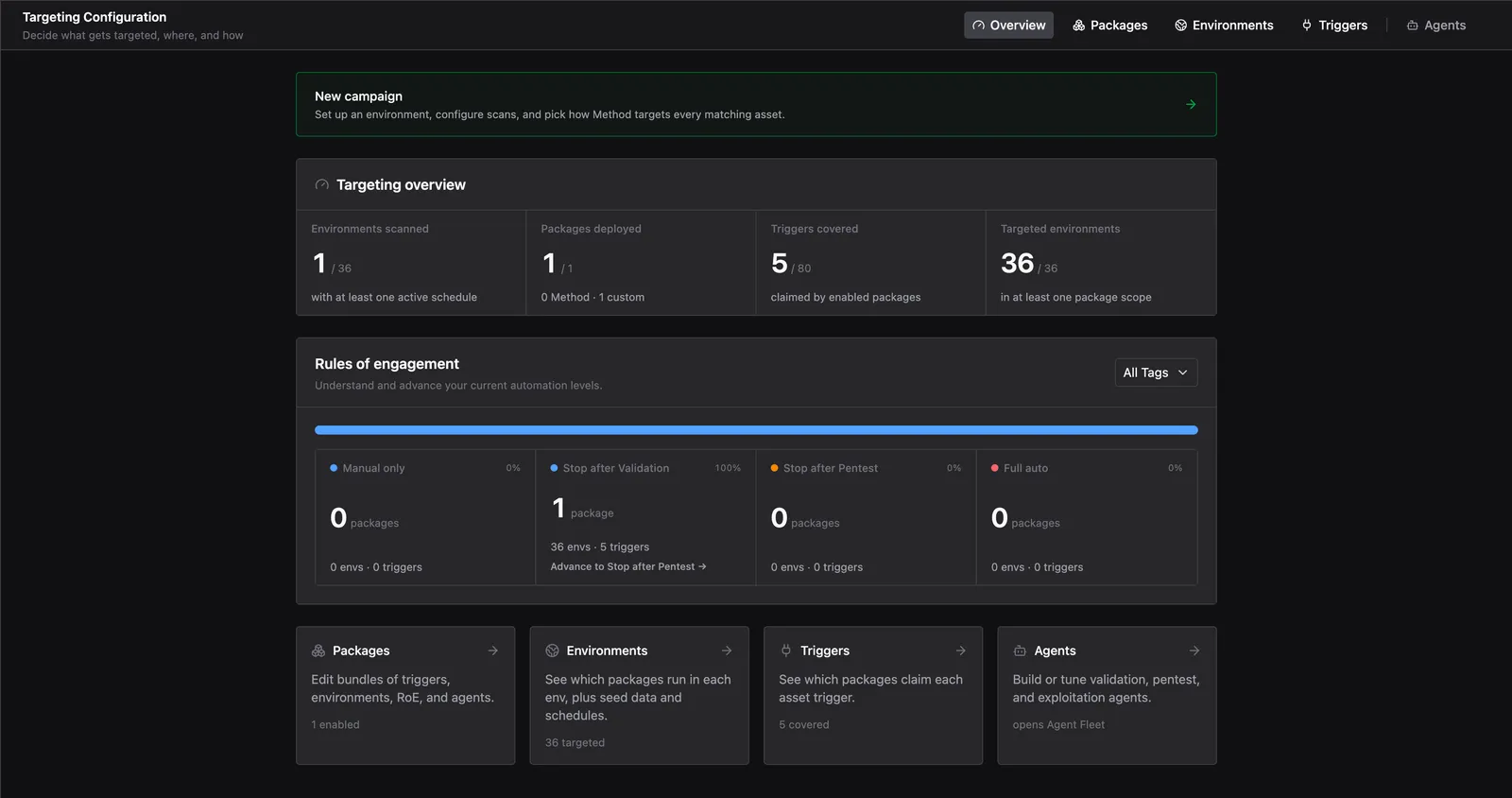
All Targeting configuration flows through Packages. A Package answers two questions: why is this asset being targeted, and how is Targeting performed? Packages, Triggers, Environments, Agents, and Rules of Engagement work together to define what gets targeted, by whom, and under what constraints.
Packages
Packages are the top-level configuration object for Targeting. Each Package bundles the Triggers that select assets, the Agents that work them, and the Rules of Engagement that control how far automation proceeds.
Method ships a set of native Packages covering common attack surface categories: Web, Network, Cloud, Known Software, and Identity. Each native Package includes pre-configured Triggers, Agents, and per-stage coverage across Map, Research, Pentest, and Compromise.
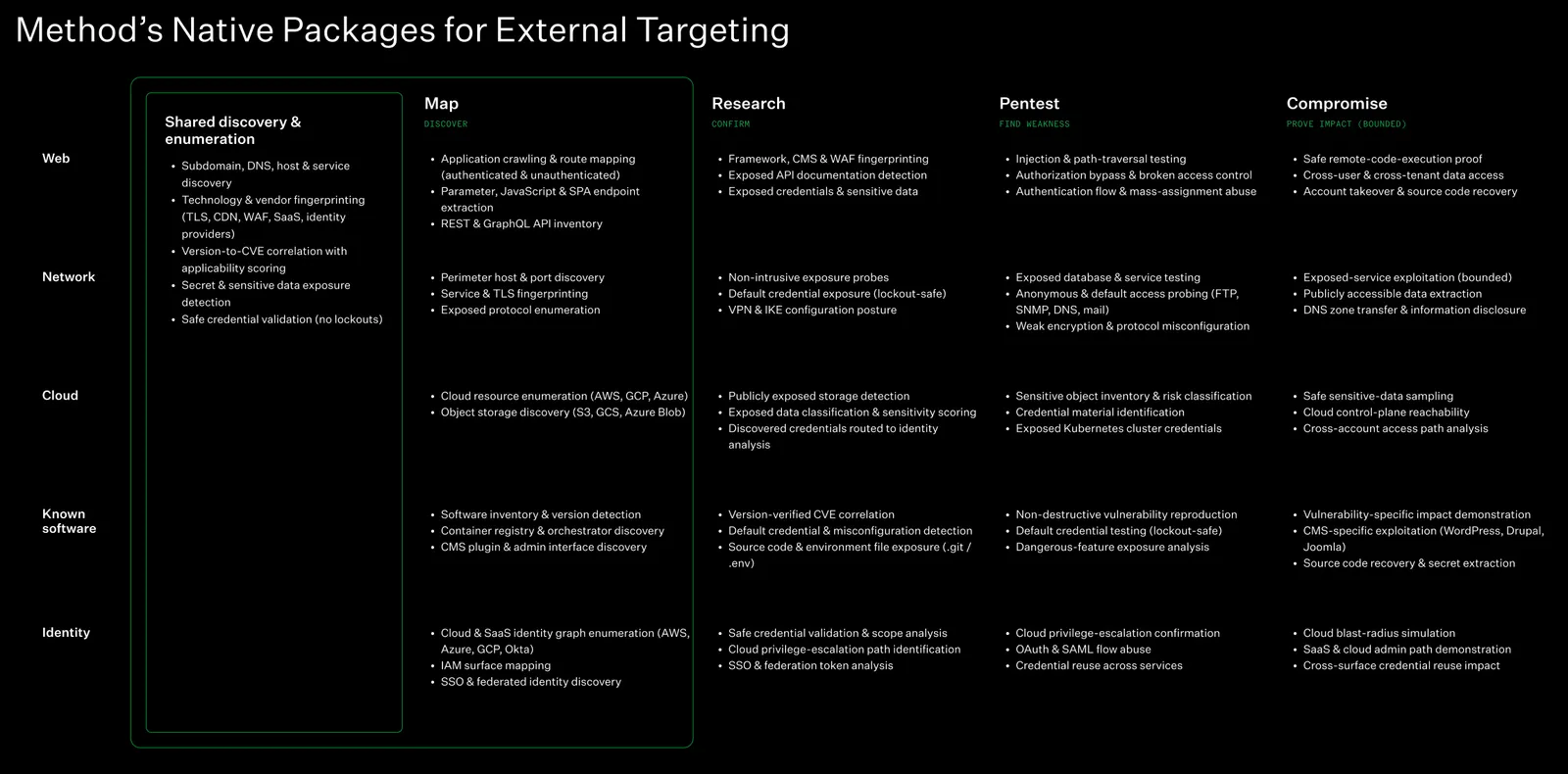
Native Packages are a starting point, not a fixed configuration. Every Package is customizable: you can tune a native Package or build one from scratch. You can enable or disable Packages at will, and a single Package can apply across all Environments or target a specific subset.
When multiple Packages operate over the same Environments and Triggers, Method surfaces an overlap warning. You can choose to keep both (creating separate Targets for each Package) or consolidate to a single Package for that combination.
Environments
Environments bound the set of assets a Package operates over. An Environment can represent a business unit, an AWS account, a scoped engagement, a region, or any other meaningful asset grouping.
Environment here does not mean development, staging, or production in the software delivery sense. In Targeting, the production stack is called “the stack.” An Environment is a bounded asset scope: the unit over which a Package applies.
A Package can apply to all Environments or to a specific subset. The more Environments a Package covers, the more Targets it generates. Environments that have scheduled scans already configured cannot have additional scan schedules added via a Campaign: each Environment supports one scan setup at a time.
Triggers
Triggers are deterministic searches over the structured data discovered in an Environment. They decide which assets become Potential Targets.
Each Package declares one or more Triggers. Triggers can be broad or specific:
- Broad: select an entire class of assets (e.g., “all externally exposed databases”). Broader Triggers generate more Targets but may include assets that require more filtering downstream.
- Specific: select assets that match a precise condition on a particular asset type (e.g., “S3 buckets with public ACLs”). More specific Triggers produce a smaller, higher-confidence set of Targets.
The more Triggers a Package declares, the more Targets it generates. Use Explorer to query your Environment’s Objects before finalizing Trigger selection to estimate how many Targets a given combination will produce. See Explorer for details.
Method ships a standard set of Triggers covering common exposure and vulnerability classes. Because each Trigger is a filter over your Ontology, you can inspect any Trigger’s underlying Object definition in Explorer under Ontology Definitions.
All available Triggers
Agents
Agents execute each stage of the Targeting lifecycle against the Targets a Package generates. A Package has three Agent slots, one per stage:
- Research Agent: confirms the Target is real and accessible, performing basic enumeration and filtering false positives before any offensive action runs.
- Pentest Agent: systematically tests the researched Target across every applicable vector to confirm whether a vulnerability class is present, without demonstrating impact.
- Compromise Agent: starts from a confirmed Pentest Finding and climbs the corresponding impact ladder to prove consequence and severity within a bounded blast radius.
Each stage only triggers if the previous stage succeeds. A large top-of-funnel narrows quickly as Agents filter at each step. When building a Package, you select an Agent for each slot. Method surfaces pre-built Agents compatible with the Package’s Triggers, or you can build a custom Agent to encode your own tradecraft.
For a full walkthrough of Agent configuration, see Create an Agent.
Web Agents in depth
The Research, Pentest, and Compromise Agent slots behave differently depending on the surface a Package covers. This section describes the mechanics of the native Web Package’s three Agents specifically. Network, Cloud, Known Software, and Identity Packages run different tradecraft suited to their own surface type.
Research does almost no probing on its own. Instead it runs a fixed sequence of specialist Subagents and stitches their output into one Report:
- Web Application Fingerprinter: identifies the technology stack, including server framework, language, web server, WAF, CDN, CMS, and the client-side stack.
- Discovery Path Prober: walks well-known paths and opaque surface.
- Spider: crawls for routes, and is told explicitly to hunt the authentication surface (registration, login, password reset) even when nothing links to it.
- API Specification Inspector: looks for a published OpenAPI/Swagger document or an introspectable GraphQL endpoint, which gives a far richer surface than crawling does.
- JavaScript Analyst: reads the app’s JS bundles for endpoints and configuration.
- Sensitive Data Analyst: scans everything collected for credentials and other sensitive material.
If the app has genuinely self-serve sign-up (no admin approval, invite code, CAPTCHA, or SSO redirect), Research adds a conditional seventh step: it registers its own test account, logs in, and sends Spider back through authenticated. That surfaces routes anonymous crawling never sees, and is the one place Research makes requests itself rather than delegating.
Research hands over what it found: the technology stack, every path and parameter (tagged by where it lives: query, body, form, header, cookie, or URL path), every JS bundle, the auth surface, and notable files, each tagged as anonymous or auth-only. It also writes a prioritized list of what Pentest should attack first, with the observation that motivates each entry.
A characterization only counts if this session’s own probe produced it: records already in the Ontology are context that tells Research what to look for, never the deliverable. Surface Research could not confirm still travels forward labeled unconfirmed, since dropping an unreached route is a worse failure than passing one along marked uncertain.
Pentest does not crawl. It reads the surface Research produced back through an Ontology Analyst Subagent. If what comes back is thin, Pentest stops and routes the Target back for a Research re-run rather than filling the gap itself.
From that surface, Pentest builds a sink set: one row per endpoint, method, and parameter. A sink is anywhere in the application that a value the attacker controls reaches logic that matters, such as a search box, a URL ending in a record number, or a filename in a path. The set includes sinks that are easy to miss, notably login and registration fields, JSON responses a single-page app renders, unauthenticated write endpoints, and any route that serves a file by name.
Pentest then loops over the sink set one sink at a time: classify the sink by shape, load that vector’s methodology, walk the entire technique catalog against it, record, and move on. Confirming one variant does not end the walk, so five injectable parameters produce five Findings, not one.
The walk runs vectors needing no login first: injection, path traversal, and unauthenticated authorization probes. Only then does it move to vectors needing test identities: IDOR, privilege escalation, mass assignment, auth flow abuse, and JWT abuse. Credential handling is the most failure-prone part of a run, so it sits where breaking it cannot cost coverage that never needed a credential.
Pentest hands over one Finding per confirmed instance, carrying the vector, the exact sink, the technique that worked, request and response evidence, and a minimal reproduction. It also emits a verdict table with one row per vulnerability class it was granted, so nothing gets silently skipped. Pentest deliberately does not demonstrate impact, chain two confirmed vulnerabilities together, or use credentials it recovered: those belong to Compromise.
Compromise works one confirmed Finding at a time. It needs four things from the Pentest Report: the vector, the sink, the identity setup, and a working proof of concept. If any is missing, it stops rather than redoing Pentest’s work. Its first action is always to re-run the handed-over proof of concept against the live Target. If that no longer works, the Target does not advance.
Compromise then climbs the impact ladder for that vulnerability class, an ordered list of increasingly severe consequences, until it reaches the ceiling: the worst thing that vulnerability class can do on that Target. Stopping early because a lower rung already looked serious understates the Finding, but climbing past the ceiling burns budget and widens blast radius without changing the answer.
Every action Compromise takes is classified before it is taken. This taxonomy is what keeps an automated Agent safe on a live customer environment:
Escalating through the confirmed vulnerability is the same Finding; reaching a different vulnerability is not. A SQL injection that reaches command execution is one Finding at its ceiling, not two. A rung that happens to reveal an unrelated vulnerability gets written up and handed back to Pentest to confirm separately.
A WAF blocking a payload is always Blocked, never a clean negative: you cannot show a sink is protected when the payload never reached it. Going the other way, a phase that reproduced something but is only unsure whether it is worth another cycle should choose Exhausted, since re-running costs a full cycle to arrive in the same place.
What each phase hands the next
The prioritized list is the part most likely to be underestimated. Pentest treats it as its order of work, not as background reading, so a Research Report that hands over an unordered inventory wastes the characterization it just produced.
A worked example
A scan finds a web application on a customer’s external surface. A Trigger matches it, so it becomes a Targeted Target.
Research fingerprints it as a Node.js app behind a CDN, crawls it, finds a Swagger document at /api-docs, reads the JS bundles, and spots a public sign-up form. It registers a test account, logs in, and re-crawls.
It hands over 40 routes, the parameters on each, which are visible only when logged in, and a ranked list putting the product search endpoint and the basket routes first because both take user-controlled identifiers. The Target becomes Researched.
Pentest reads that surface back from the Ontology, builds a sink table of 60 rows, and starts with the classes needing no login. The search parameter is injectable, so it walks the full SQL catalog against it and confirms three variants.
It then registers two test identities and walks the basket routes, confirming one account can read another’s basket. Two Findings, each with its own reproduction. The Target becomes Vulnerable.
Compromise takes the SQL injection Finding, re-runs the proof of concept, and climbs. It reads its own test data, then samples 10 records belonging to other identities, which contain email addresses and password hashes.
It establishes that the database account can reach command execution and runs exactly one whoami to prove it, then stops, because that is the ceiling for this class. It writes the narrative and raises the severity. The Target becomes Compromised.
Rules of Engagement
Rules of Engagement (RoE) define how much autonomy Method has and what it must avoid. They span four controls: the Stage Policy, the No Strike List, and Risk Axes, all set on the Package, plus the Agent Tool Policy, set on the Agent itself.
Stage Policy
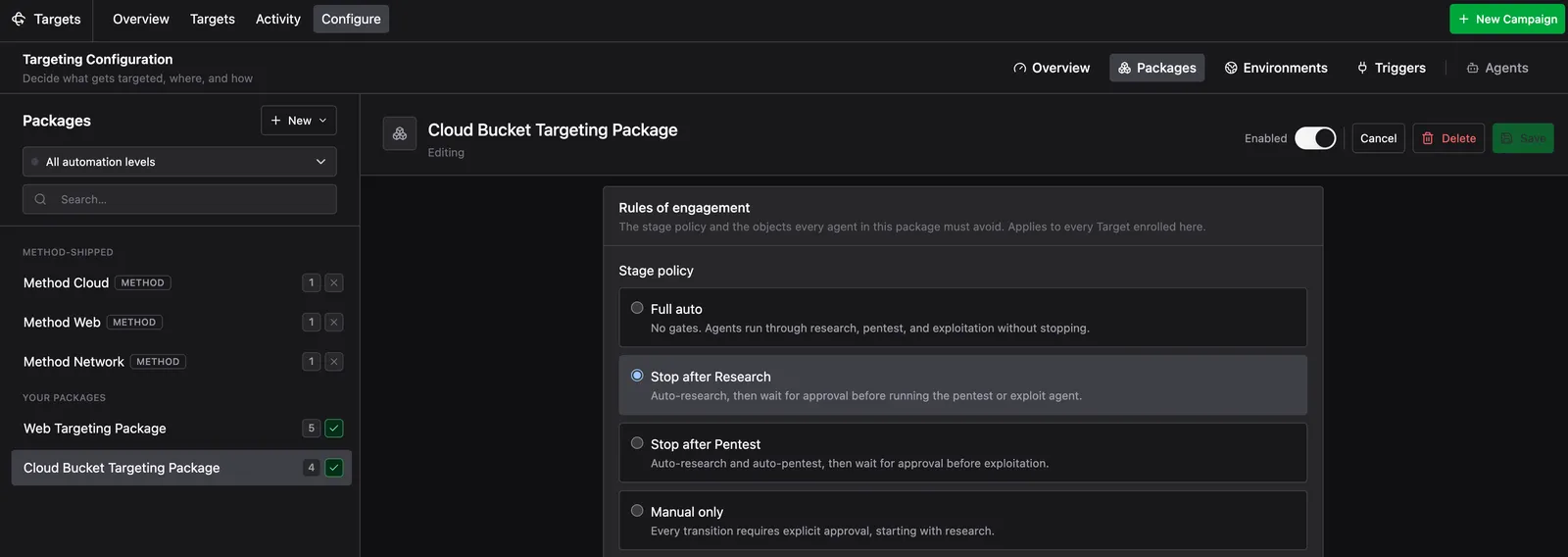
The Stage Policy defines how far automation proceeds before a human signs off:
- Full auto: Agents run through Research, Pentest, and Compromise without stopping.
- Stop after Research: Research runs automatically; you approve before any Pentest or Compromise activity runs.
- Stop after Pentest: Research and Pentest run automatically; you approve before Compromise.
- Manual only: Every transition requires explicit approval, starting with Research.
When a Target hits a Stage Policy gate, Method flags it as blocked. It cannot advance until you approve the next action from the Target detail view.
No Strike List
The No Strike List defines the Objects and filters that every Agent in a Package must avoid, regardless of Stage Policy. Anything it covers is excluded from the Package’s automated activity, whether Research, Pentest, or Compromise. Use it to protect assets that automation should never touch, such as third-party systems or critical production infrastructure.
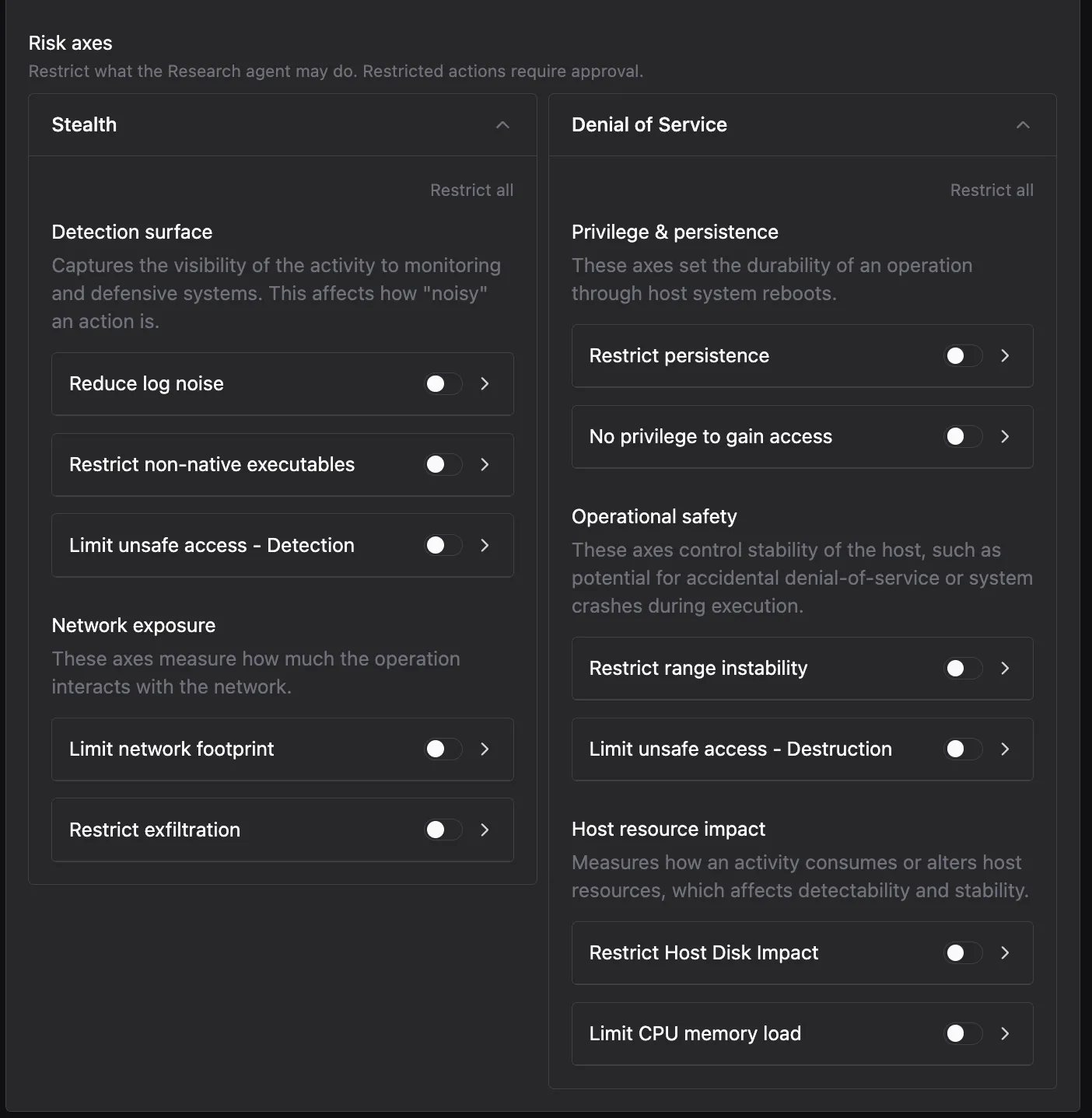
Risk Axes
Risk Axes constrain what an Agent may do while it runs, grouped along two dimensions: Stealth (how visible and noisy the Agent’s activity is) and Denial of Service (how much the Agent’s actions risk host stability and availability). Restricted actions require your approval before an Agent takes them, so you can grant autonomy on safe behavior and gate anything riskier. Risk Axes are set per Agent, per stage.
Agent Tool Policy
The Agent Tool Policy is configured on the Agent itself rather than on the Package. It limits which Tools an Agent is allowed to use, and how it may use them, regardless of which Package runs it. See Create an Agent for how to set it.
Targeting Overview
The Targeting Overview tab shows the distribution of Stage Policy settings across all enabled Packages. Use it to see which Packages are running fully automated, which require human approval at specific stages, and whether any gaps exist in coverage. This is a read-only summary view; configure RoE settings within each Package.
Campaigns
A Campaign deploys a Package against an Environment and puts Targeting into motion. For a full walkthrough, see Start a new Campaign. Packages, Triggers, and Rules of Engagement define the configuration. A Campaign runs that configuration against a scope of assets.
The Campaign wizard walks through six stages:
- Environment: pick or create the Environment where the Campaign runs
- Input data: seed the Campaign with Critical Domains and CIDR Ranges
- Intel & no-strike: upload intelligence and define No Strike List Protection Rules
- Scan setup: set how often Method runs scans and where scan tasks execute
- Targeting: choose which Packages apply to every matching asset, or build a new one inline
- Review: confirm the configuration and launch
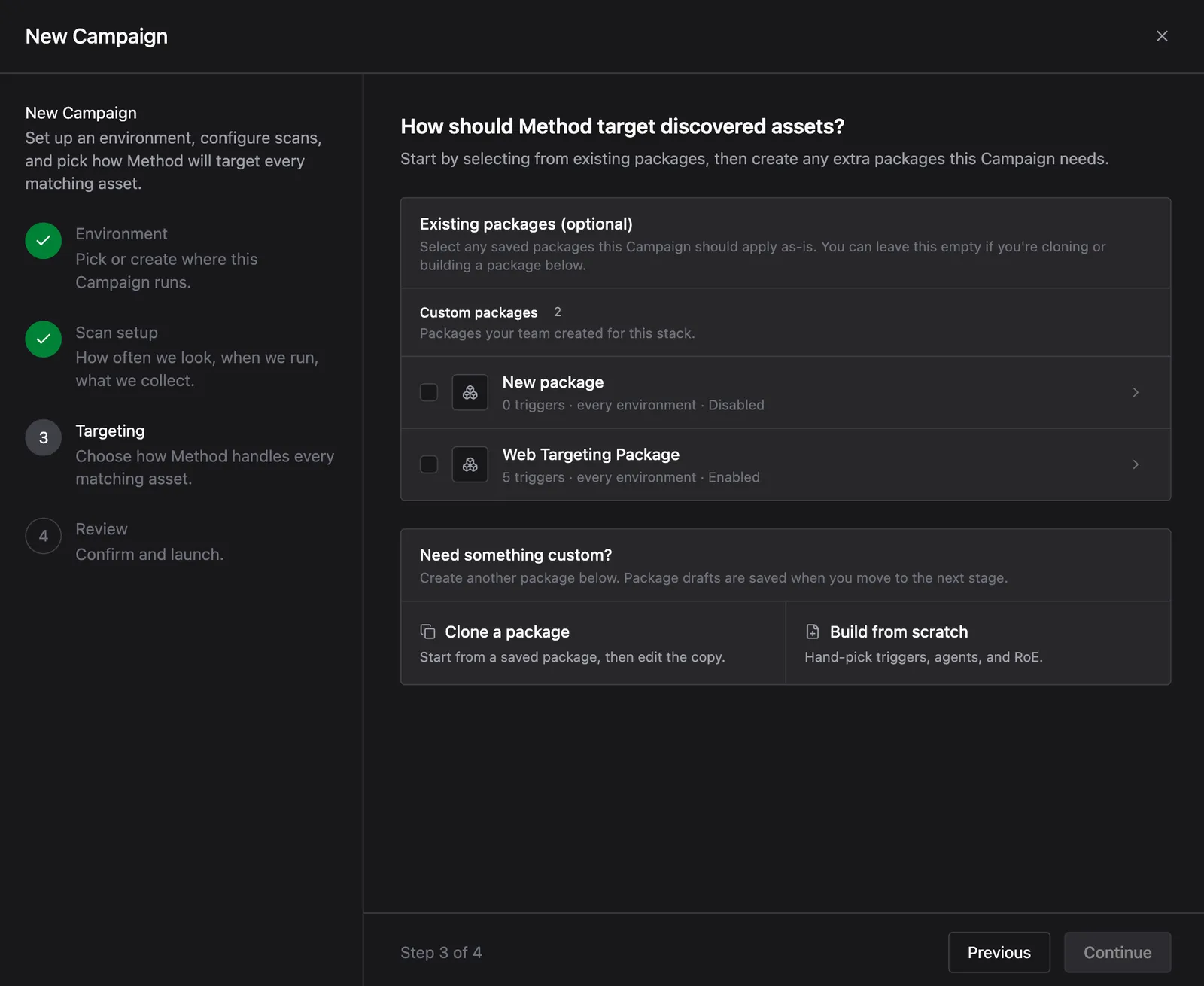
As a Campaign runs, its Triggers evaluate the Environment’s Objects and select matches as Potential Targets. Those Targets populate the Targeting funnel and advance through it as Agents work them.
For step-by-step guidance on setting up a Campaign, building a Package, or reviewing Targets, see the Targeting guides.