

AI Inference
Method routes every AI request through a Model Provider you configure. This page describes what Model Providers and Model Defaults are, how they fit together, and the fields that matter most when wiring up a new provider.
What is a Model Provider?
A Model Provider is a connection to an LLM endpoint. It tells Method where to send requests, how to authenticate, and which specific models are available for use. Every AI capability on Method, including Agents and Operator, runs against a Model Provider you have enabled.
You manage providers from the Administration app under AI Inference > Model Providers.
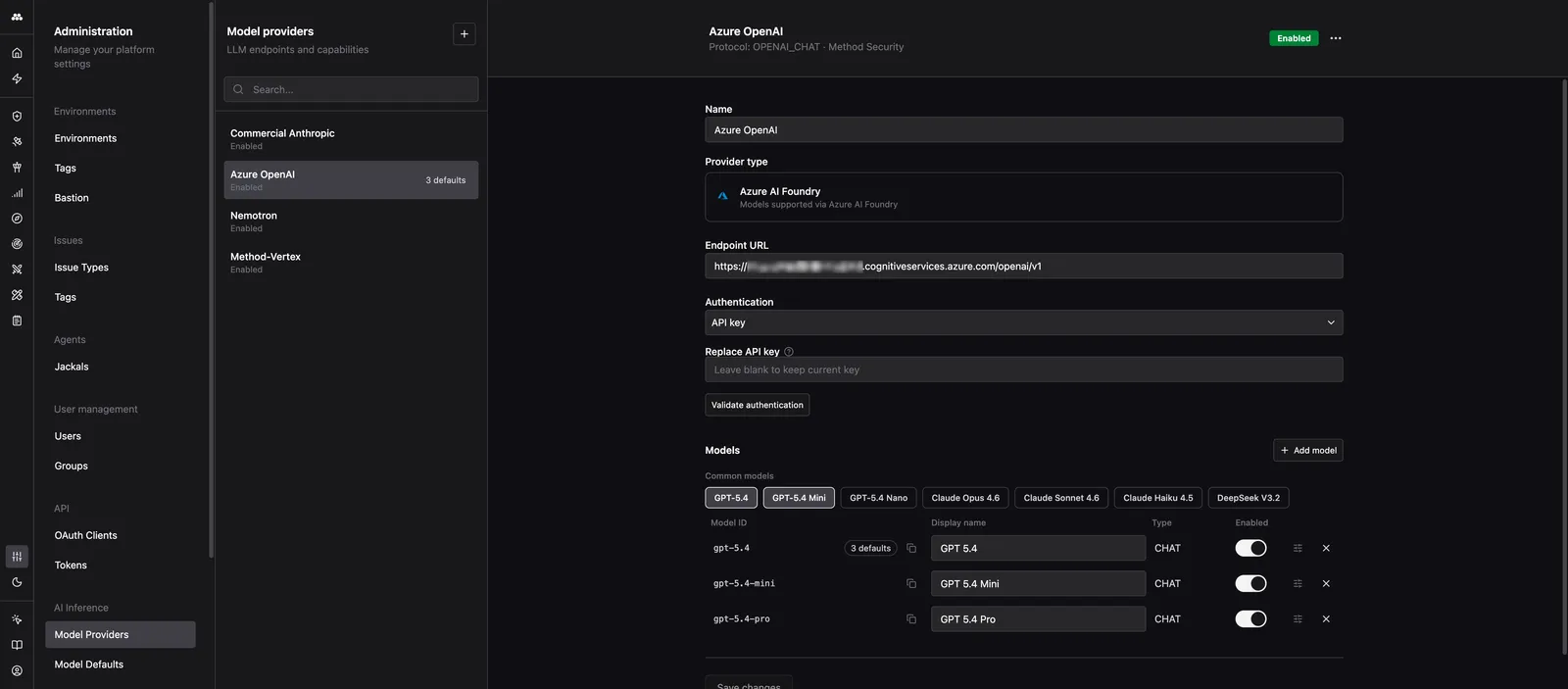
Provider types
When you create a new provider, you pick a provider type. The type sets the protocol Method uses to talk to the endpoint and the fields you fill in.
- OpenAI: GPT-5.4 and other OpenAI models.
- Anthropic: Claude and other Anthropic models.
- Azure AI Foundry: Models served through Azure AI Foundry.
- OpenAI Compatible: Any endpoint implementing the OpenAI chat API. Use this for self-hosted models, gateways, or third-party providers that expose an OpenAI-compatible surface.
- Vertex AI: Google Vertex AI models exposed through an OpenAI-compatible endpoint.
Provider fields
Every provider has the same set of top-level fields.
Name
A human-readable label shown in pickers across the platform. Use something recognizable like Azure OpenAI - East US or Self-hosted Llama. The name has no effect on routing.
Endpoint URL
The base URL Method sends requests to. The exact format depends on the provider type:
- OpenAI Compatible and most gateways: the base URL must end in
/v1. For example,https://your-provider.com/v1. The form reminds you of this with the helper text “Most OpenAI-compatible APIs expect the base URL to end in /v1”. - Azure AI Foundry: typically
https://<resource>.services.ai.azure.com/modelsor the Azure OpenAI equivalent ending in/openai/v1. - Vertex AI: the OpenAI-compatible Vertex endpoint for your project and region.
If you are not sure whether your URL is correct, do not guess. Fill in the authentication and use Validate authentication (see below) to confirm Method can reach the endpoint.
Authentication
The credential Method uses to call the endpoint. Three options are available:
- No auth: the endpoint is open or network-restricted.
- API key: a bearer token or API key.
- Google Service Account: a service account JSON. Used for Vertex AI and other Google endpoints.
Validate authentication
The Validate authentication button sends a lightweight request to your endpoint with the credential you provided. Use it to confirm the URL, credential, and network path are all correct before you rely on the provider. A failed validation almost always points to a wrong endpoint path (missing /v1, wrong region, wrong deployment) or a wrong key.
Models
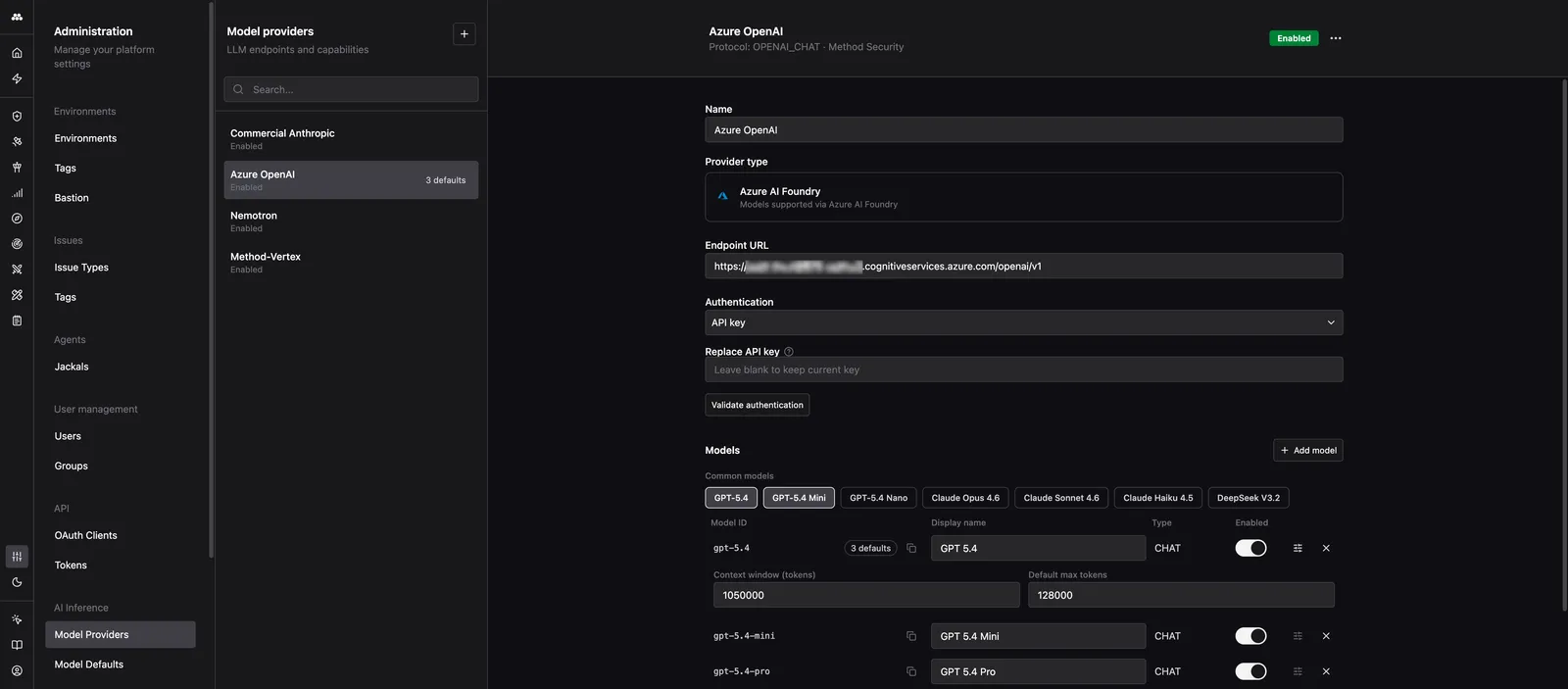
A provider exposes one or more models. Each model row captures how Method refers to that model and what it is capable of.
Model ID
The Model ID is the exact identifier Method puts in the model field of every request to the endpoint. It must match what the provider expects character-for-character. If the ID is wrong, the provider returns an error and the model will not work even if everything else is configured correctly.
Examples:
- OpenAI:
gpt-5.4,gpt-5.4-mini - Anthropic:
claude-sonnet-4-6,claude-haiku-4-5 - Azure AI Foundry: the deployment name you created in Azure (not the model family name)
- OpenAI Compatible: whatever string your gateway or server accepts
Double-check the Model ID against your provider’s documentation or dashboard. Copy and paste it when you can.
Display name
The friendly name shown inside Method UI (Agent configuration, model pickers, default slots). You can rename this anytime without affecting routing.
Type
- CHAT: conversational and tool-calling models. This is what Agents and Operator use.
- EMBEDDING: text embedding models, used for semantic search and retrieval.
Enabled
Toggle a model off to hide it from every picker across the platform without deleting the configuration. Disabling is reversible, deleting is not.
Advanced settings
Expanding Advanced settings on a model exposes two optional fields:
- Context window (tokens): the maximum combined input and output tokens the model accepts.
- Default max tokens: the default output token limit Method applies when a caller does not specify one.
Leave these blank to use Method’s built-in defaults for well-known models. Set them explicitly for custom or self-hosted models where Method has no way to know the model’s limits.
What are Model Defaults?
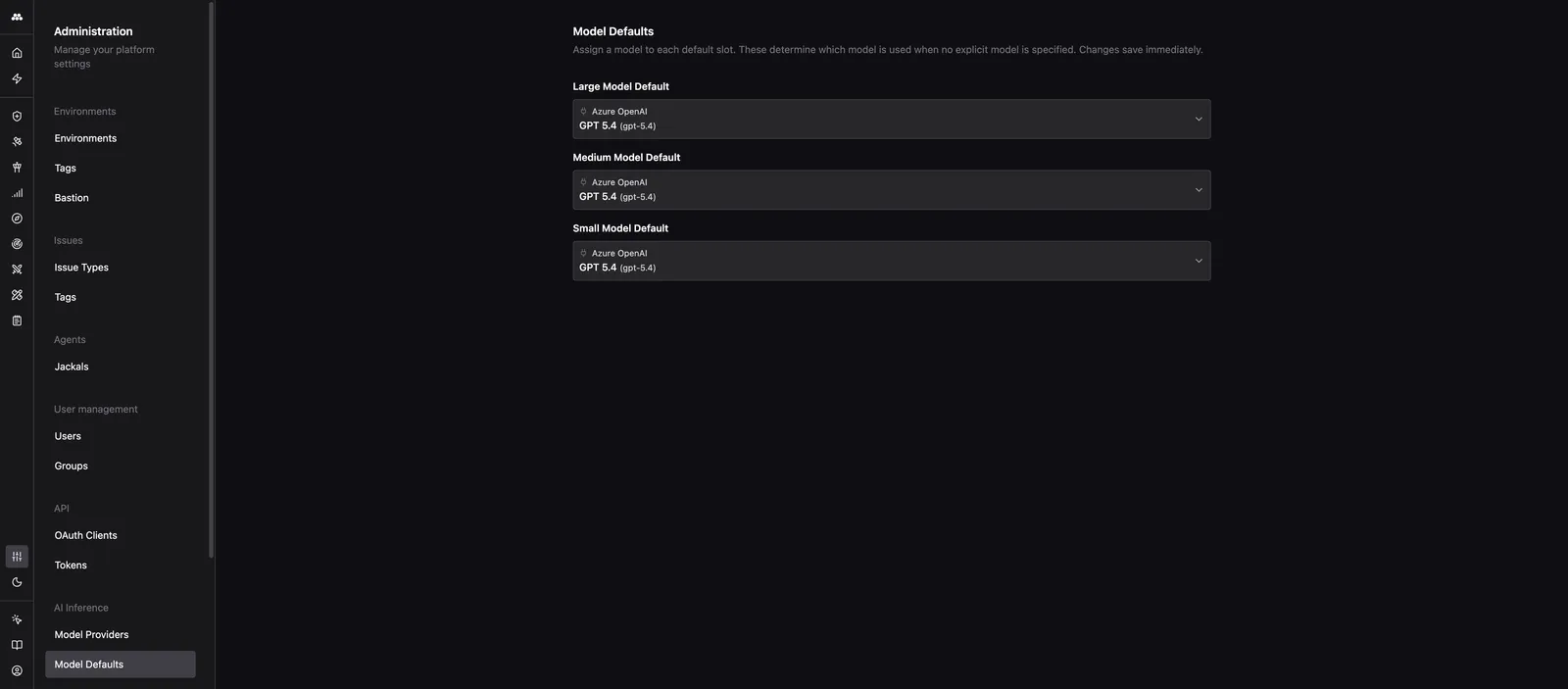
Model Defaults pick the model Method uses when a caller does not specify one. They keep Agent configs, Tasks, and system prompts decoupled from any one provider so you can swap models without editing every consumer.
The three slots
Method exposes three default slots. Every AI call that does not pin a specific model resolves to one of these.
- Large Model Default: used for deep reasoning, long-horizon planning, and the most capable workflows. Use your strongest model here (for example, GPT-5.4 or Claude Opus 4.6).
- Medium Model Default: the everyday workhorse. Used by most Agents and Operator turns. Pick a model that balances quality, latency, and cost.
- Small Model Default: used for cheap, fast, high-volume calls such as summarization, classification, and tool argument extraction. Pick a fast, inexpensive model.
How defaults are used
Agents and other callers ask Method for a size class (large, medium, or small) rather than a specific model. Method looks up the matching default slot and uses whatever model is assigned.
Changing a default in the Administration app instantly redirects every Agent and workflow that asks for that size class to the new model. There is no redeploy and no config to update elsewhere.
Setting defaults
On the Model Defaults page, pick any enabled model across any provider for each slot. Changes save immediately. Any enabled model from any enabled provider is eligible for any slot.
For a step-by-step walkthrough of wiring up a new provider, see Add a model provider.